Integrating Routers with the Nile Access Service
When deploying the Nile Access Service, integration between the Nile Service Block (NSB) and the customer’s upstream routers or firewalls is a critical step. This section provides guidance on how to configure router integration to ensure a successful deployment.
Physical Connectivity
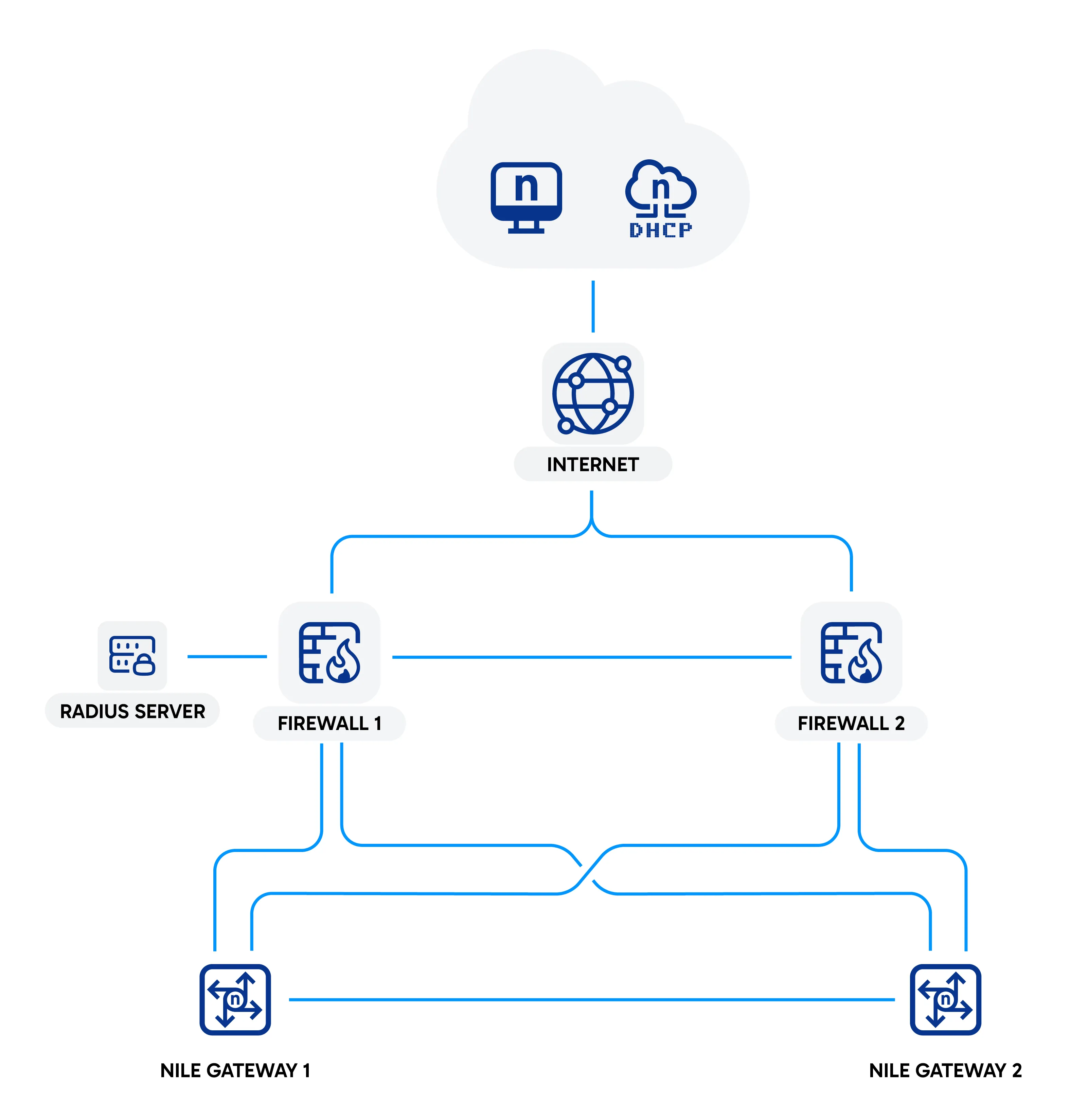
All Nile access and distribution switches provide several high-speed uplink ports for connecting to the customer’s upstream routers or firewalls. Nile recommends connecting each NSB gateway to the customer’s upstream devices through these high-speed uplink ports.
The Nile Service Block supports uplink speeds ranging from 1 Gbps to 100 Gbps. Both Ethernet and fiber optic ports are available, depending on throughput requirements and the customer’s existing infrastructure.
Logical Setup and Routing
NSB Routing
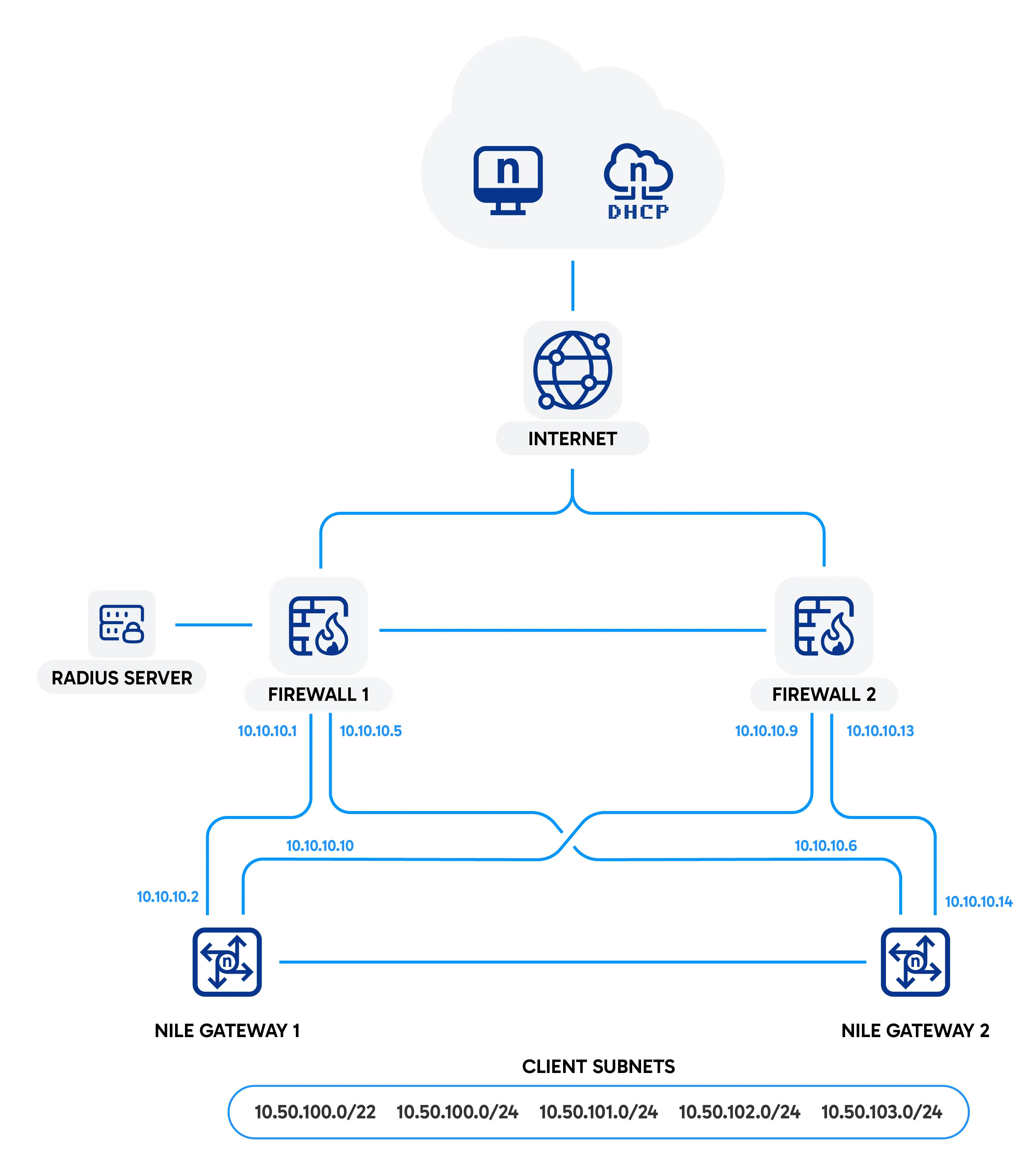
Because the Nile Access Service operates entirely at Layer 3, there is no Layer 2 VLAN trunking between the NSB and the customer’s upstream routers. All traffic is routed between the NSB and upstream devices.
Routing is achieved through Open Shortest Path First (OSPF) or Equal Cost Multi Path (ECMP), with OSPF as the recommended method.
OSPF Integration
The NSB requires an upstream router or firewall for connectivity to the Nile Cloud. Each NSB gateway, which can be an access or distribution switch, serves as the default gateway for all Nile elements such as access switches, access points, and sensors.
- NSB gateways operate in an active active configuration.
- Traffic is routed to the upstream router or firewall using OSPF by default.
- No configuration is required on the NSB gateways themselves. The upstream firewall or router configuration is sufficient for the NSB gateways to automatically learn routing parameters from OSPF hello messages.
- The customer must configure the upstream routers or firewalls to advertise a default route (0.0.0.0/0) towards the NSB gateways via OSPF. This ensures that Nile elements have reachability to external networks and the Nile Cloud.
Example OSPF Configuration:
ECMP Integration
- If OSPF is not available, the NSB gateways can use static routes with ECMP. In this case:
- The customer must configure the upstream devices with equal cost routes to the client subnets behind the NSB.
- The key requirement is that all routes to client subnets remain reachable from the upstream devices.
Example ECMP Configuration
Regardless of the routing method, the NSB remains the default gateway for all client subnets. Upstream routers and firewalls must always be able to reach these gateways.
Service Bringup
To activate access switches, access points, and sensors, the NSB gateway requires the following parameters:
- Two uplink IP addresses. One is optional, but two are recommended for redundancy.
- A subnet for switches and access points. This subnet is used to assign IP addresses to Nile elements.
- A subnet for Nile sensors. Sensors are treated as client devices and require a separate subnet for monitoring.
- DNS server (optional).
- NTP server (optional).
These parameters are transmitted to the NSB gateway through Bluetooth during bringup.
Firewall and ACL Configuration
Firewalls or router ACLs must be configured to allow communication between NSB elements and Nile cloud services. The following rules are required:
HTTPS (TCP/443)
Permit outbound HTTPS traffic to the following domains and IPs:
- u1.nilesecure.com
- ne-u1.nile-global.cloud
- Resolves to 52.13.104.212, 100.20.40.199, 52.12.186.175
- https://s3.us-west-2.amazonaws.com/nile-prod-us-west-2(required only for device upgrades)
DNS (UDP/53)
Permit outbound DNS to the following default servers used by NSB elements (not clients):
- 8.8.8.8
- 8.8.4.4
If customer DNS servers are preferred, they must be configured to accept DNS requests from NSB elements.
NTP (UDP/123)
Permit outbound NTP traffic to the following default servers used by NSB elements (not clients):
- time.google.com
- pool.ntp.org
If customer NTP servers are preferred, they must be configured to accept NTP requests from NSB elements.
RADIUS
Permit RADIUS authentication (UDP/1812 and UDP/1813) from the Nile management subnet to the customer’s RADIUS servers.
DHCP
Permit DHCP traffic (UDP/67 and UDP/68) from subnets used in the NSB to the customer’s DHCP servers.
Summary
By following these connectivity and firewall configuration guidelines, customers can ensure that the Nile Service Block integrates seamlessly with upstream routers and firewalls, and that all Nile elements can communicate securely with required cloud services and authentication systems.