Nile RADIUS
Nile RADIUS-as-a-Service Technical Overview
1. Why Nile RADIUS-as-a-Service vs. Traditional On-Prem NAC (Aruba ClearPass, Cisco ISE)
Traditional RADIUS solutions such as Aruba ClearPass or Cisco ISE are powerful but complex platforms that require significant infrastructure, ongoing maintenance, and expertise. By contrast, Nile RADIUS-as-a-Service simplifies this model by delivering authentication and authorization entirely from the cloud.
Key Advantages:
- Eliminates On-Prem Hardware & VM Maintenance No need to deploy, scale, or patch dedicated NAC appliances or servers. RADIUS-as-a-Service is always up to date, fault-tolerant, and highly available. The AAA functionality provided by the incumbents can suffer from split brain and db-replication issues as nodes within a cluster are managed by proprietary logic. These issues do not plague Nile RADIUS as hardened Cloud database services are used to ensure reliability and consistency.
- Simplified Integration Traditional deployments require manually configuring shared secrets, NAS IP addresses, RADIUS server IPs, or RADSec proxies. With Nile’s tightly integrated design, none of this is required — it just works with Nile Access Service.
- Faster Rollout New sites can be onboarded without standing up additional infrastructure. Authentication and authorization services are instantly available everywhere your Nile Access infrastructure runs.
- Cloud-Scale Security All communication between Nile infrastructure and RADIUS-as-a-Service is carried over encrypted gRPC tunnels, avoiding the need to set up RADSec or in most cases un-encrypted. Customers don’t need to worry about securing RADIUS traffic with additional measures.
- Operational Efficiency Instead of a team of NAC specialists maintaining a complex rules engine, customers can use Nile’s simplified policy framework to achieve the same outcomes in fewer steps.
2. How Nile RADIUS-as-a-Service Differs from Cloud NAC Platforms (Portnox, SecureW2, etc.)
Cloud NAC platforms like Portnox or SecureW2 are designed to work across many infrastructure vendors. While flexible, this vendor-agnostic model introduces complexity — admins still have to configure and maintain the integration points (NAS IPs, certificates, shared secrets, tunnels).
Nile’s approach is different:
- Built-In with Nile Access Service Our RADIUS-as-a-Service is an add-on that only works with Nile Access Service. This tight coupling eliminates the integration overhead and risk of misconfiguration.
- No Setup Between Infra & RADIUS With traditional networks, admins must explicitly configure how the infrastructure communicates with RADIUS (shared secrets, NAS IPs, RADSec setup). With Nile, this step disappears — the communication channel is already securely established.
- End-to-End Encryption by Default Even though RADIUS-as-a-Service runs in the cloud, all transactions are encrypted inside the existing gRPC tunnels Nile Access uses. There is no exposure of RADIUS traffic across the internet.
This architecture gives customers the benefits of cloud scale and reliability without added complexity.
3. Key Features
Step 1: Authentication
- Supported Method: EAP-TLS
- How it works: Customers upload their server certificate and private key. End-user devices and IoT systems authenticate using mutual TLS, ensuring strong, certificate-based identity validation.
- Please ensure you have the following before
Server Certificate
Private Key
Optionally add CA Certificate
Demo Mode for Rapid Testing Nile RADIUS-as-a-Service provides a demo mode where certificates for both server and clients are auto-generated with a single click. Three client certificates are created, each with unique emails, and can be downloaded directly to devices for testing. Certificates are valid for 7 days and can be regenerated at any time.
- Advantage: Enables quick proof-of-concept and validation without requiring certificates from your external CA.
Demo mode and production certificates cannot be active at the same time. Only one mode may be used.
Step 2: Authorization
- Policy-Based Access Control Policies are created using attributes such as:
- SCIM group membership
- Intune compliance status
- Certificate attributes (e.g., CN, OU)
- SSID / wired
- Dynamic Policy Evaluation Policies are evaluated at the time of authentication, ensuring real-time enforcement of access decisions.
- Actions After Match
- Accept or Reject access
- Assign to specific segments
- Apply Palo Alto tags for firewall integration
This gives admins fine-grained control over who gets on the network, and what access they have
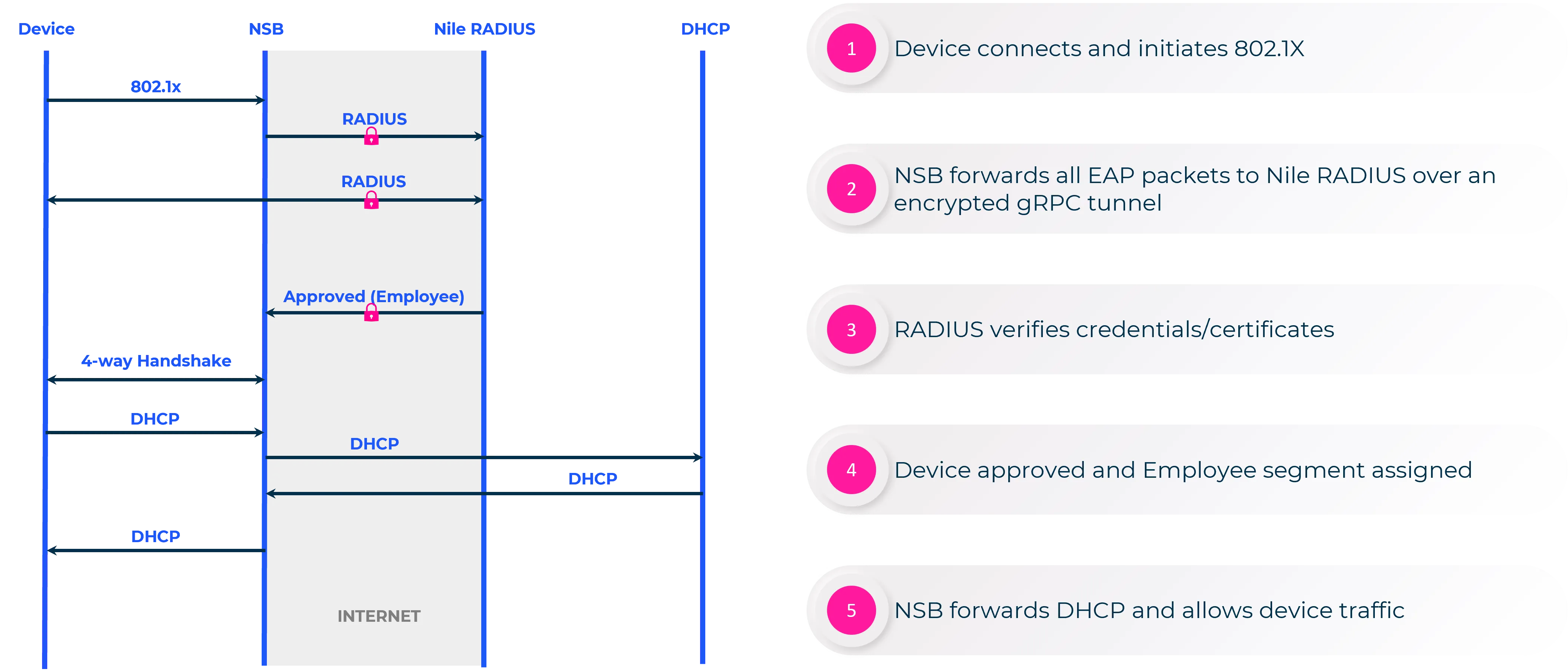
Following is a ladder diagram on how the traffic flows:
4. Expanded Use Cases
Use Case 1: Segregating Employees and Contractors on the Same SSID
Many organizations want to keep the wireless experience simple for end users by providing a single corporate SSID. However, behind the scenes, they often need to ensure that different types of users (for example, full-time employees vs. contractors) have different levels of access to resources.
With Nile RADIUS-as-a-Service, this can be achieved seamlessly through policy sets. When a user authenticates with EAP-TLS, the system checks multiple attributes:
- SSID Name – ensures the user is connecting to the corporate Wi-Fi.
- Intune Compliance – validates that the device meets company security standards (e.g., correct OS version, not jailbroken, up-to-date patches).
- SCIM Group Membership – identifies whether the user belongs to the “employees” group or the “contractors” group.
If the attributes match the employee policy set, the user is accepted and assigned to the Employee Segment, which might have full access to internal applications. If the attributes match the contractor policy set, the user is assigned to the Contractor Segment, which might only allow access to email and limited corporate applications.
Outcome: Both groups connect to the same SSID without confusion, but they are automatically separated into the right network segment with the right access privileges. No manual segment assignments or SSID sprawl is needed.
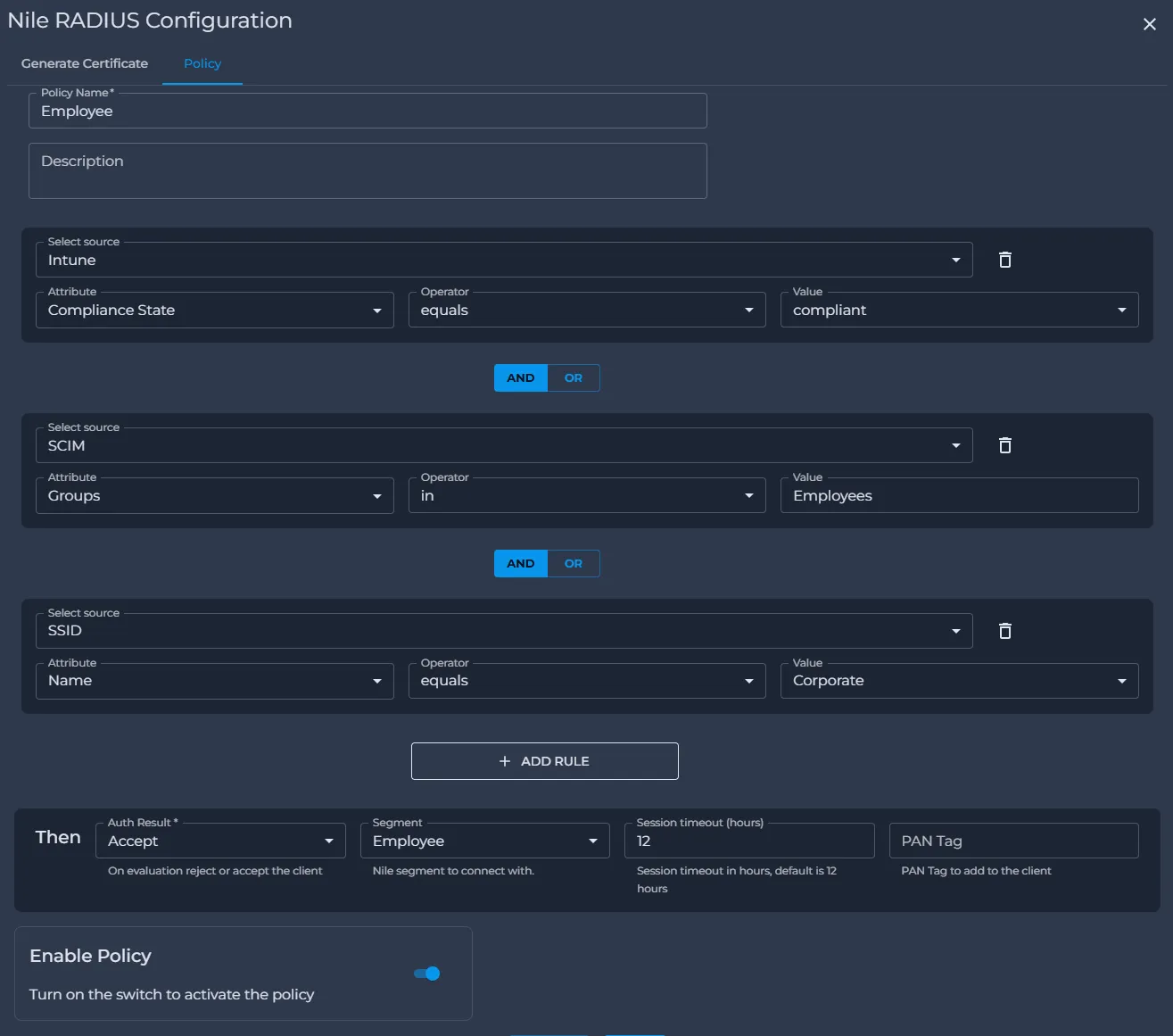
Employee Policy Set:
- SSID Name = “Corporate”
- Intune Compliance State = compliant
- SCIM Groups = employees → Accept and assign Employee Segment
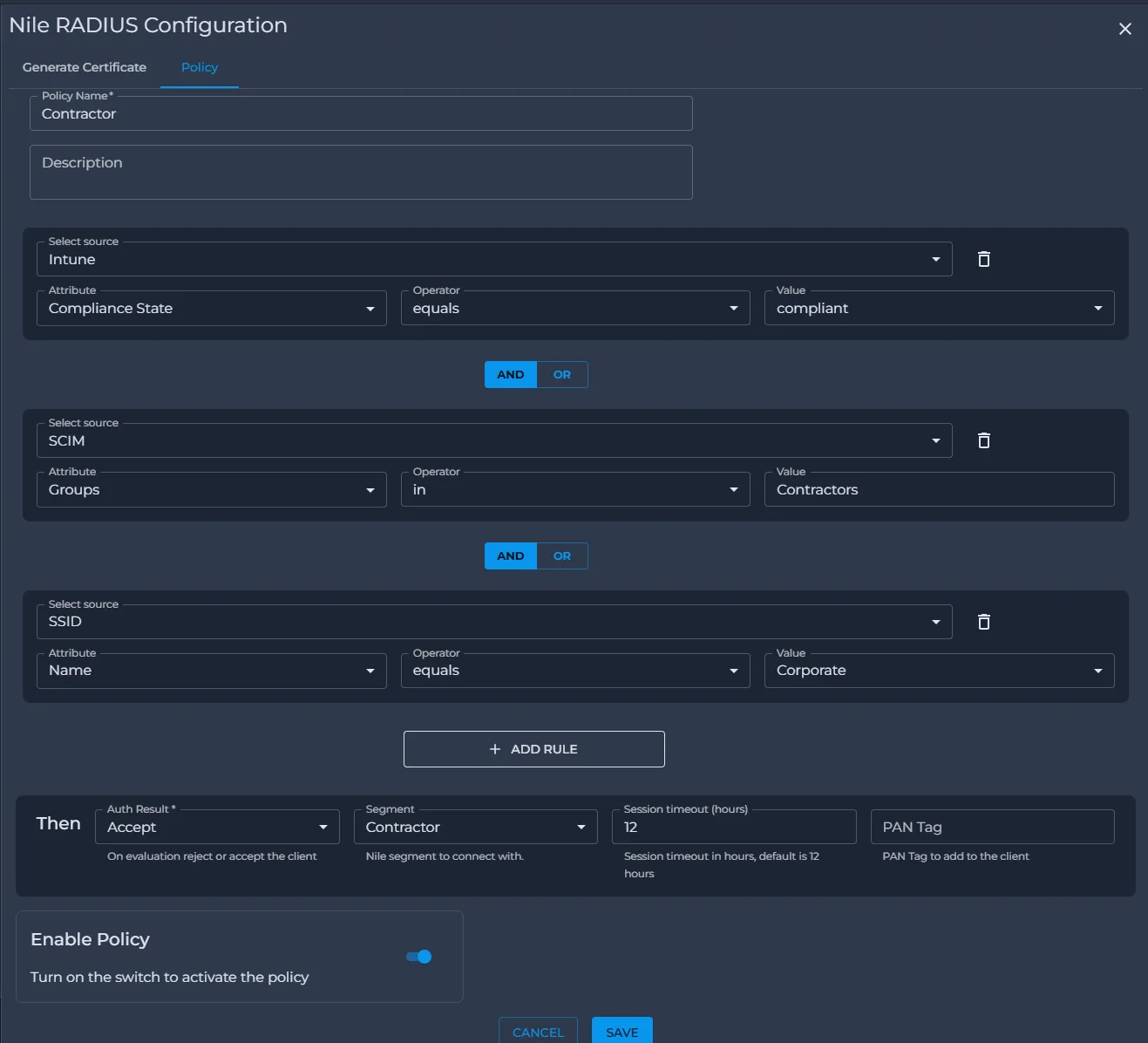
Contractor Policy Set:
- SSID Name = “Corporate”
- Intune Compliance State = compliant
- SCIM Groups = contractors → Accept and assign Contractor Segment
Use Case 2: Restricting Access to Active Employees Only (Dynamic SCIM Integration)
Organizations often need to ensure that only active employees can connect to the network. When an employee leaves the company or their account is disabled, access should be revoked immediately to maintain security.
With Nile RADIUS-as-a-Service, this is achieved through dynamic SCIM integration:
- Nile connects directly to the organization’s identity provider (IdP) using SCIM.
- As soon as a user is disabled in the IdP, the IdP notifies the Nile Cloud.
- Nile automatically terminates that user’s active session and revokes network access in real time.
From an admin’s perspective, the policy is simple:
- If the user is in the employees SCIM group and is an active user, then allow access.
Because the corporate SSID is already mapped to a single segment, no explicit segment assignment is needed — the SCIM group membership combined with active user status governs access.
Outcome:
- Instant off-boarding: Disabled or inactive users lose connectivity immediately.
- Real-time security: No risk of inactive accounts remaining connected.
- Seamless on-boarding: New hires gain access the moment they are added to the IdP group and activated.
This ensures that network access is always aligned with both group membership and account status, without any delay or manual intervention.
Policy Set:
- SCIM Groups = employees AND Active = true → Accept (user is placed in the segment already mapped to the corporate SSID)
Use Case 3: IoT Device Segmentation Using Certificates
IoT devices such as IP cameras, printers, medical equipment, or barcode scanners often support 802.1X but do not have an end-user identity tied to them. These devices need to be on-boardedin a way that ensures they are properly segmented from user devices.
With Nile RADIUS-as-a-Service, admins can leverage certificate attributes for classification. For example:
- IoT devices can be issued certificates where the CommonName field contains a category string like “Camera” or “Scanner.”
- A policy set can be defined: If certificate CN contains “Camera,” place the device in the Camera Segment.
- Similar policies can be created for printers, sensors, or other device categories.
Outcome: IoT devices automatically end up in the appropriate segment with the right access controls and eliminates SSID sprawl. For instance:
- Cameras can only reach the video management server.
- Printers can only talk to the print server.
- Medical devices can only access the approved application servers.
This prevents IoT devices from having broad access to the corporate network, reducing the attack surface and meeting compliance requirements
Example Policy Set
- Certificate CommonName contains “Camera” → Accept and assign Camera Segment
Use Case 4: Gradual Migration from an Existing NAC Solution
Many enterprises already use a legacy NAC solution (such as ClearPass or ISE) and want to migrate to Nile RADIUS-as-a-Service without disrupting ongoing operations. Nile makes this possible by allowing customers to run both systems in parallel during the transition.
- Wireless: For new sites, map SSIDs to Nile RADIUS. These sites will immediately start using Nile RADIUS-as-a-Service. Existing sites can continue using their legacy RADIUS solution until you are ready to migrate them.
- Wired: For wired 802.1X, Nile provides a “Wired DOT1X” checkbox. If this is enabled, your existing NAC solution continues to handle wired authentication. If not enabled, Nile RADIUS takes over. This ensures that wired authentication flows can be migrated in a controlled manner.
Outcome: Customers can migrate at their own pace. They can bring new sites online with Nile RADIUS from day one, while gradually transitioning older sites. This avoids a risky “big bang” migration and lets admins test and refine policies before rolling out widely.
Use Case 5: Enforcing Policies with Palo Alto Firewalls Using Tags
Some organizations centralize all of their access and security enforcement on Palo Alto firewalls, where policies are built around tags.
Nile RADIUS-as-a-Service seamlessly integrates with Palo Alto firewalls:
- A policy set can be created where the match criteria reference SCIM groups.
- Based on the SCIM group membership, Nile RADIUS attaches the corresponding Palo Alto tag during authorization.
- The firewall receives the tag exactly as expected, so no changes are needed to existing firewall policies.
Example Policy Set
- SCIM Groups = sales AND Active = true → Accept and assign Palo Alto tag = ent-sales
Outcome:
- Zero firewall changes – Existing Palo Alto policies continue to work without modification.
- Consistent enforcement – Tags set in Nile RADIUS match the firewall’s security model.
- Streamlined policy management – Identity and network access decisions happen in Nile, while enforcement continues in Palo Alto using familiar tags.
This ensures a smooth hand-off between authentication/authorization in Nile and enforcement in the firewall, without disrupting established security practices.
5. High-Level Workflow to Setup an SSID with Nile RADIUS
- Upload Certificates
- Navigate to Network Setup → Authentication → Nile RADIUS
- Upload server certificate and private key, then save
- Create Segments
- Define network segments and map them to Nile RADIUS and DHCP
- Configure SSID
- Create SSID(s) and map them to one or more segments
- For wired 802.1X, segment mapping is sufficient (no SSID needed)
- (Optional but Recommended) Create Policies
- Define policy sets based on SSID, Intune, SCIM (e.g., employees AND Active = true), or certificate attributes
- Assign actions (Accept → Segment assignment, Reject, Timeout, Palo Alto tags)
- FAQ
Q. Does the Nile RADIUS service run in the Cloud or On-prem?
A. The Nile RADIUS service runs entirely in the cloud.
Q. Are the transactions between the on-prem components and the cloud encrypted?
A. Yes. All communication is encrypted using secure gRPC tunnels established between the Nile Service Block and the Nile cloud.
Q. What ports need to be opened?
A. Only outbound TCP 443 is required.
Q. Is RADIUS accounting supported?
A. Yes. Nile uses RADIUS accounting to update key session parameters (such as IP addresses) in the cloud.
Q. Is the Nile RADIUS monitored?
A. Yes. Nile RADIUS is monitored every minute from every site, reporting availability and transaction latency.
Q. What happens when the Internet goes down?
A. Existing authenticated sessions remain active. Devices continue roaming seamlessly due to locally cached PMK. New or re-authentication attempts will not work until connectivity is restored.
Q. Can we see detailed logs of all transactions?
A. Yes. Detailed logs are available on both the Device Details page and the RADIUS Monitoring page.
Q. What EAP types are supported?
A. Nile currently supports EAP‑TLS (certificate based auth). Additional EAP methods will be supported in the future.
Q. Does Nile support end-user on-boarding?
A. Nile does not operate a PKI, on-boarding workflows—such as certificate enrollment, distribution, and renewal—must be performed through your existing MDMs
Q. How does Demo Mode (demo certificates) work?
A. Demo Mode auto‑generates a server certificate and three unique client certificates for quick EAP‑TLS testing—no external CA required. Certificates are valid for 7 days and can be regenerated. Only Demo Mode or production certificates can be active at one time.
Q. Does Nile RADIUS support SCIM?
A. Yes. Nile integrates with SCIM‑enabled IdPs such as Azure AD and Okta. SCIM provides real‑time user and group updates to enforce dynamic access policies.
Q. How quickly does Nile react when a user is disabled in the Identity Provider?
A. SCIM updates are immediate. When a user is disabled, Nile instantly revokes access and terminates active sessions.
Q. What MDM and/or EDR solutions does Nile support?
A. Today, Nile integrates natively with Microsoft Intune for device compliance and posture checks. Support for additional MDM and EDR platforms will be added in future releases.
Q. Can Nile send role‑based or group‑based tags to Palo Alto firewalls?
A. Yes. Nile can send Palo Alto tags leveraging the Palo Alto XML API based on SCIM groups, allowing firewalls to apply existing policies without modification.
Q. Does Nile support wired 802.1X?
A. Yes. You can build dedicated policy sets for wired devices such as printers, VoIP phones, and IoT equipment.
Q. Does Nile RADIUS support guest and temporary access like ClearPass and ISE?
A. Guest access is provided natively through Nile Access Service and is independent of the RADIUS service
Q. Do we need to configure RADIUS IPs, shared secrets, RadSec, or port settings?
A. No. As a full‑stack solution, Nile eliminates all traditional RADIUS infrastructure configuration. The Service Block automatically establishes a secure connection to the cloud RADIUS service.
Q. Is the RADIUS service redundant?
A. Yes. Nile RADIUS runs in a resilient cloud architecture with automatic fail-over.
Q. How scalable is the service?
A. Nile RADIUS scales automatically to support large authentication bursts across multiple sites.
Q. Does Nile support devices that do not use 802.1X?
A. Methods such as MAC‑based authentication and UPSK are supported for IoT and legacy devices natively through Nile Access Service and is independent of the RADIUS service