Nile's Channel Planner - RF Optimization
Channel Planner at Nile
Nile delivers access networks as a service with SLA-backed guarantees. To achieve this, Nile fundamentally simplified the design and architecture of the Nile Service Block, which provides the access network. The goal is to eliminate manual configurations and dependence on customer IT expertise, while ensuring the network is deployed to a high design standard.
At Nile, the process of building a robust enterprise wired and Wi-Fi network begins as early as Day 1 of the customer journey.
The Channel Planner is part of the AI Automation Center. Customers and partners are not required to manually configure or tune any channel planning parameters. This document explains how the Channel Planner operates and the optimizations it applies.
Day 1 to Day 1
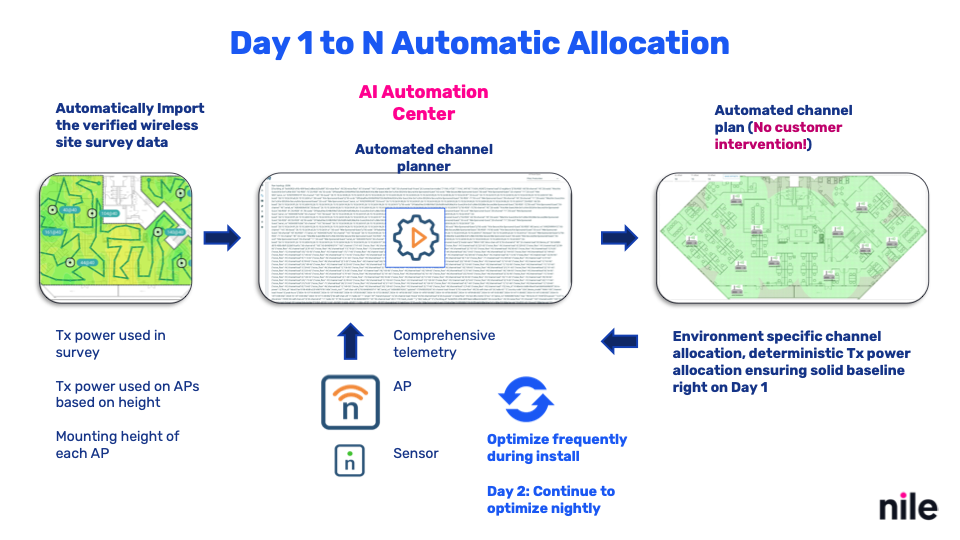
Comprehensive Data Gathering
Nile and its partners conduct a detailed site survey to collect information on existing infrastructure, capacity requirements, coverage needs, and applications in use. Data is gathered on IDF and MDF locations, cable lengths, and in many cases, on-site RF surveys are performed to define proposed AP placement.
Setting Up a Robust Network
Survey data is extracted and fed into the Channel Planner. Information such as AP height and transmit power settings (used to achieve -67 dBm predictive coverage) is also stored. This removes guesswork from the channel planning process and avoids manual configuration errors.
Day of Installation
With the Nile Nav application, installers follow a step-by-step procedure using clear floor maps. APs are activated at prescribed locations. Any deviation beyond the allowed threshold is automatically flagged for correction.
Channel Planner
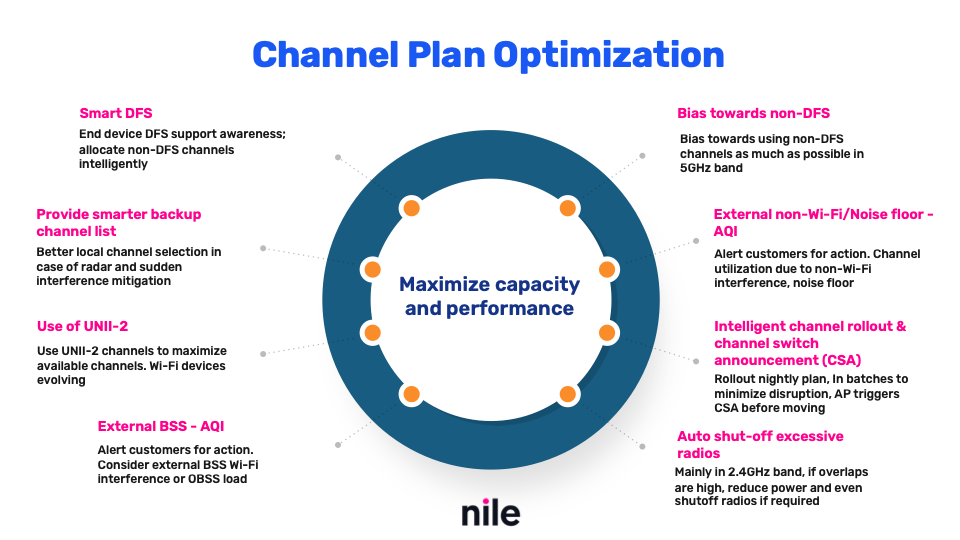
The Channel Planner optimizes Wi-Fi capacity and performance by managing channel configurations intelligently. It ensures maximum bandwidth, reliability, and coverage, while detecting environmental changes such as new obstructions or unexpected coverage holes.
If anomalies in RSSI measurements are detected, the Nile team is alerted. Support engineers then work with the customer to evaluate the need for a new site survey or the addition of APs.
The Channel Planner evaluates multiple parameters simultaneously, including noise floor, AP density, external BSS interference, and channel utilization, to generate the best possible channel plan.
Key Features
Frequent Planning During Installation
- During installation, the Channel Planner runs frequently to ensure APs already online are operating with optimal channel and power settings.
- This enables early validation of DHCP, DNS, RADIUS, throughput, and interference testing before the full floor is deployed.
- Once installation is complete, planning transitions to a nightly schedule.
Spatial Separation and BSS Coloring
- Maximizes separation between APs to reduce interference.
- Uses BSS coloring to distinguish overlapping signals and minimize contention.
Importance: Prevents co-channel and adjacent-channel interference, leading to stable connections and improved performance.
Optimization: Unique identifiers in BSS coloring allow overlapping signals to coexist without excessive collisions.
Channel Width Optimization
- Dynamically adjusts channel width (20, 40, 80 MHz) depending on client density and interference.
- Ensures the right balance between high throughput and minimal interference.
Importance: Wider channels provide more throughput but can increase interference in dense environments.
Optimization: Channel Planner continuously adapts to conditions for the best efficiency.
Utilization of UNII-2 Bands
- Prioritizes underutilized UNII-2 channels.
- Reduces congestion in the UNII-1 band and improves performance.
External BSS Consideration
- Scans for neighboring networks and adjusts channel allocation accordingly.
- Minimizes overlap with external Wi-Fi signals in dense environments.
Bias Towards Non-DFS Channels
- Prefers non-DFS channels in the 5 GHz band.
- Avoids radar detection events that can cause disruptive channel changes.
Noise Floor Management
- Detects interference from non-Wi-Fi devices such as microwaves and Bluetooth equipment.
- Maintains a low noise floor to support higher data rates.
Coverage Hole Mitigation
- Monitors for AP failures or weak coverage zones.
- Adjusts power levels or recommends additional APs to close gaps.
Auto Shutoff of Radios
- Primarily used in the 2.4 GHz band.
- Shuts off redundant radios in overlapping coverage areas to minimize interference.
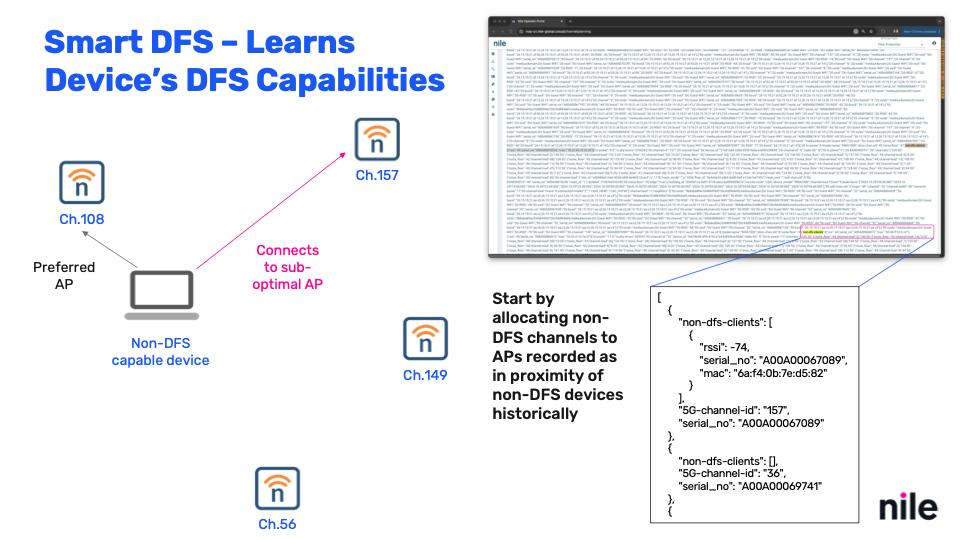
Smart DFS
- Considers device support for DFS channels.
- Prevents disruptions for devices that do not handle DFS well.
Smarter Backup Channel List
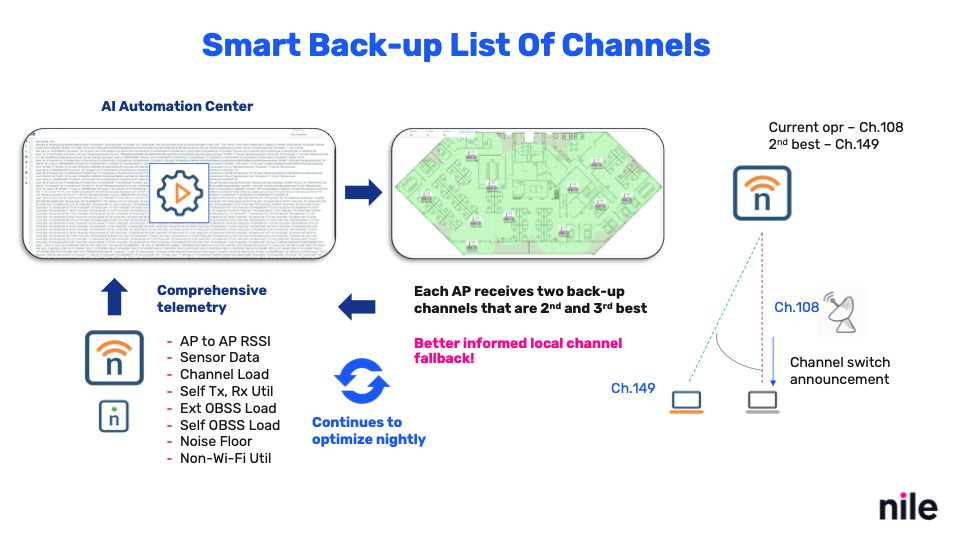
- Maintains a dynamic backup channel list.
- Ensures smooth channel transitions during radar detection or interference events
External BSS Alerts with Air Quality Index
- Provides Air Quality Index (AQI) metrics for the RF environment.
- Generates alerts so administrators can take proactive action against external interference.
Intelligent Channel Rollout and CSA
- Uses planned channel rollout and Channel Switch Announcements (CSA).
- Minimizes disruption during channel changes by informing devices ahead of time.
Conclusion
The Channel Planner treats Wi-Fi channel planning as a mathematical optimization problem. Its goal is to maximize performance by carefully balancing capacity, bandwidth, interference, and client density.
Important Note on Roaming
Disabling lower data rates on Wi-Fi access points does not improve roaming behavior. Roaming effectiveness depends primarily on AP transmit power and overall network design.
While disabling lower rates may help reduce co-channel interference and encourage higher throughput, administrators should focus on transmit power tuning, site design, and workload requirements to truly optimize performance and roaming.