WIDS/WIPS
Introduction
Wireless Intrusion Detection System (WIDS) is a technology designed to protect wireless networks from unauthorized access. It achieves this by monitoring traffic on the network to identify any suspicious activity that may indicate a security breach.
Wireless Intrusion Prevention System (WIPS) employs a combination of techniques to detect and alert about intrusions in real time. This system not only monitors but also takes action to mitigate rogue access points wired to the Nile Service Block (NSB). For man-in-the-middle attacks, denial-of-service floods, and any other threats to the wireless network, Nile detects, alerts, and sends a notification to the customer.
Why are these systems important?
Wi-Fi presents a tempting attack surface for threats that can compromise data and network security. While Wi-Fi standards have evolved and become more secure with advancements in Wi-Fi security protocols, hackers can still exploit a variety of vulnerabilities. So, using WIDS/WIPS is essential for several reasons:
Improved Wireless Security: WIDS/WIPS are designed to detect and alert concerning any unauthorized activities on the wireless network in real-time. This is important to secure sensitive data and prevent unauthorized access to your network.
Compliance: Some industries are required to use intrusion detection systems as a part of regulatory requirements. WIDS/WIPS can help meet compliance regulations by providing a detailed audit log of network activity and potential breaches.
Increased Visibility: WIDS/WIPS allows businesses to monitor their wireless networks visually. This includes tracking access points, users, devices, and more, which is beneficial for identifying potential weak areas in the network and improving security measures.
Proactive Threat Management: Using WIDS/WIPS means being proactive about threat management. Rather than reacting to security incidents after they happen, a WIDS can warn you of potential vulnerabilities and threats before they become security incidents.
Protects from Inside and Outside Threats: WIDS/WIPS protects from external threats and potentially harmful activities originating from inside the network, providing a comprehensive wireless security solution.
Protects Wireless Networks: Traditional IDS solutions are primarily geared toward wired networks. They analyze network traffic, searching for patterns or behaviors indicative of malicious activities. While they are adept at detecting threats on wired networks, they might lack the specialized capabilities required to detect and mitigate threats specific to the wireless spectrum.
What are the different threat vectors in wireless networks?
Rogue Access Points
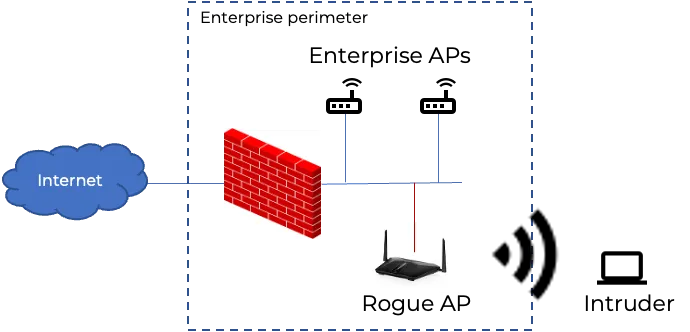
Rogue access points, or those not approved by IT, can cause a security threat if permitted to connect to the network. Many enterprises have a policy of not allowing third-party Wi-Fi access points to connect to the corporate network.
If a rogue AP connects to the network, it can broadcast its own WLAN to unsuspecting users. This creates an entry point for non-corporate devices to connect to the corporate WLAN if end-to-end security measures are not in place. This is the classic definition of a rogue AP. If not detected, bad actors can safely operate outside the physical perimeter of the enterprise, connecting to the rogue’s WLAN from the parking lot, finding an entry point into the enterprise LAN. WIDS and WIPS help to protect against rogue access points.
In the case of the Nile, the Wired Rogue AP threat vector is less severe by a large degree as compared to traditional networks, owing to the built-in 'true' Zero Trust Access. No wired device gets on the Nile network without authorization. All the ports on the Nile switches are default enabled for either MAC-address by-pass based authentication (MAB) or 802.1x. Thus, Nile's Zero Trust Access posture provides a strong first line of defense against unauthorized Wi-Fi APs getting on the network.
Impersonation: Evil Twins and Honeypot
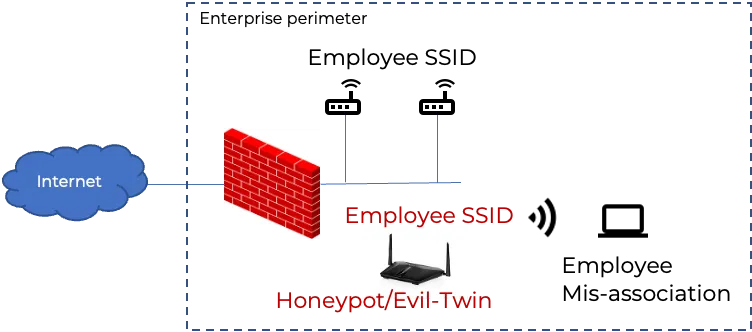
An evil twin or honeypot AP is a form of rogue AP that makes a malicious access point look like a legitimate one. Nile defines Honeypot AP as the one that impersonates the SSID of a legitimate Nile AP. Evil Twin is defined as an AP that is impersonating both the SSID and the BSSID used by it. Once users connect to the evil twin or honeypot AP, attackers can intercept any data traffic passing through this AP. This is called a man-in-the-middle attack. It may result in the compromise of login credentials and other sensitive information, such as banking data, if the user carries out transactions when connected to the evil twin. Organizations should use a WIPS to detect the presence of a honeypot or evil twin AP and prevent any corporate clients from connecting to them.
What is the difference between an Evil Twin/Honeypot AP and a Rogue AP?
A rogue access point is an illegitimate access point plugged into a network to create a bypass from outside into the legitimate network. It may or may not be malicious. For example, an employee may connect a router that functions as a rogue AP, but without ill intent. However, a lack of malicious intent does not mean that it should be connected to the network. An evil twin or honeypot is also a rogue, but it is, by definition, malicious. That’s because it is set up to impersonate a legitimate access point. Attackers use impersonation of SSID or SSID+BSSID to lure unsuspecting victims into connecting so that they can steal information. Nile defines Rogue AP as an unauthorized or accidentally authorized Wi-Fi AP that connects to a Nile switch. It is possible that such a wired rogue AP can additionally employ impersonation techniques as well. The impersonation APs, such as a honeypot or evil twin, may not necessarily be 'wired' to the Nile switches, e.g., a mobile hotspot spoofing a legitimate Nile AP's SSID
Wireless peer-to-peer connections
Ad-hoc networks or peer-to-peer Wi-Fi networks typically involve a corporate-issued device connecting to another non-corporate network that may have been set up as a wireless network by a malicious actor. Connecting to one of these makes it easy for malware to infect a network since its traffic is not going through the corporate network firewall. While Ad-hoc Wi-Fi is a very legacy standard and almost obsolete, there might be devices out there that support other forms of direct peer-to-peer connections over Wi-Fi, such as Wi-Fi Direct. These standards allow end-user bypass devices to bypass the corporate policy of disallowing peer-to-peer traffic by default.
Sniffers and Snoopers
Sniffers and snoopers typically operate passively, which means that they do not send or transmit data over the network. Instead, they simply listen in on network traffic, intercepting and recording data packets as they are transmitted between devices on the network. Criminals can use commercially available software to spy on unencrypted data in transit over the air between devices and wireless access points. While traffic on most websites is encrypted, this is not the case for every site. Mobile apps also sometimes fail to encrypt data traffic, in part because encryption imposes an overhead cost on the computing resources that support the app on the back end. WIDS and WIPS do not protect against snoopers and sniffers. IT teams can use WPA2 or WPA3 to encrypt data in transit over the air between devices and access points.
DoS attacks
DoS attacks can take several forms. For example:
- Wireless interferers affecting Wi-Fi frequencies can be used to jam certain frequencies.
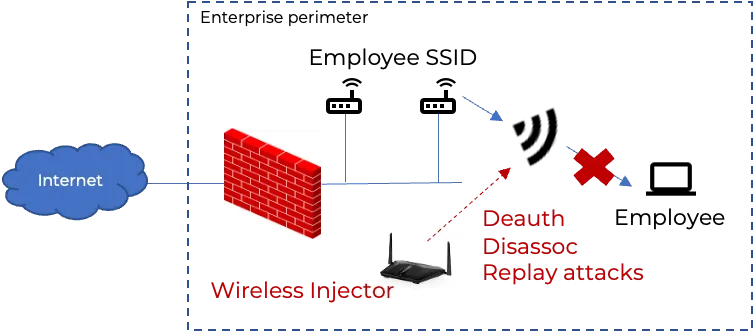
- Attackers can send a flood of de-authentication messages to connected devices, causing disruption to end users as they become disconnected from the network. Worse, this can be the first step in an evil twin/MitM attack, because when users get disconnected from a legitimate source of wireless connectivity, they may connect to the evil twin when they attempt to restore connectivity. This is one example where these hacking techniques are used in combination.
Nile's WIDS and WIPS
The Nile Access Service ensures that the overlay wireless security vector is secure.
Nile brings the ‘Nile way’ to WIDS by making it zero configuration, always on, and turnkey. The WIDS functionality kicks in right at service activation, taking on the onus to expertly enable the protection and alerting against top Wi-Fi intrusion threats.
Nile can effectively detect, alert, and mitigate rogue access points from the get-go. The Nile WIDS uses sophisticated correlation techniques that intelligently filter out non-wired neighboring/friendly access points in the vicinity, to truly alert about real threats—such as a rogue access point that is connected to the LAN. The benefit of the Nile's full-stack wireless and wired LAN service is the end-to-end visibility. It can detect the port number where the rogue AP has been plugged in and block the port, thus stopping the proliferation of the intruder into the wired LAN and further into the wider network. Furthermore, the rogue AP alert provides location information for the customer to send IT personnel to physically remove such rogue APs.
Approach to WIDS/WIPS
Classify
Successful detection starts with successful classification by learning the environment.
Authorized APs: Nile APs will be authenticated automatically by Nile switches. They use a Trusted Processing Module to authenticate the Nile AP to our cloud and also use MACSec to authenticate the AP to the neighboring/connected switch.
Authorized end devices: Following the Zero Trust principles within an NSB, every device connected to the Nile service will be authorized and authenticated. Any wireless device that successfully authenticates and passes traffic through a Nile AP is marked as authorized.
Neighbor's APs: In a shared environment, all the other APs in the vicinity that are not wired to the Nile infrastructure are classified as neighbor's APs. Nile APs have a dedicated scan/monitor radio, which will be able to identify the other BSSIDs that are being broadcast within the perimeter of the RF coverage area, and also ones in the vicinity, such as co-located tenants and/or hotspots in use.
Nile does not use any over-the-air mitigation techniques, such as sending spoofed deauthentication packets using the threat AP's BSSID.
Detect and Alert
Nile service will be able to detect and categorize the threats into the following:
Rogue AP
Any non-Nile Element that is connected to the service should be authorized and authenticated onto the network, so when a third-party access point is connected to the Nile Service, assuming these devices are not authenticated via 802.1X, they will be waiting for approval.
Navigate to the Nile Control Center >> Settings >> Access Management >> Wired.
In the case of Nile, the Wired Rogue AP threat vector is less severe with Nile by a large degree as compared to traditional networks, owing to the built-in 'true' Zero Trust Access. No wired device gets on the Nile network without authorization. All the ports on the Nile switches are default enabled for either MAC-address by-pass based authentication (MAB) or 802.1x. Thus, Nile's Zero Trust Access posture provides a strong first line of defense against unauthorized Wi-Fi APs getting on the network.
Without an admin approving this request, the device will not be able to get an IP address and hence cannot pass any traffic on to the network. Devices can be approved through different rules, such as an exact MAC address match, OUI, or fingerprint. In some cases, customers may choose to have an ALL rule that allows any devices on the network if it did not match any of the specific rules. Although an ALL rule is not recommended, the option exists to offer flexibility to the customers. Nile's WIDS/WIPS uses the following approach to reduce friction in onboarding devices while also offering security.
- Only devices approved via the ‘ALL’ rule in MAB will be treated as less safe and go through WIDS mitigation if detected as rogues
- Devices approved via a specific MAC address, OUI, or fingerprint match will be run through the WIDS check, but only alerted for (not mitigated).
- This ensures that customers who have legitimate use for certain wireless access points or wireless bridges on their network can migrate smoothly to Nile and continue operating. These devices may exhibit Rogue AP-like signatures, but Nile will only alert for these as a security measure.
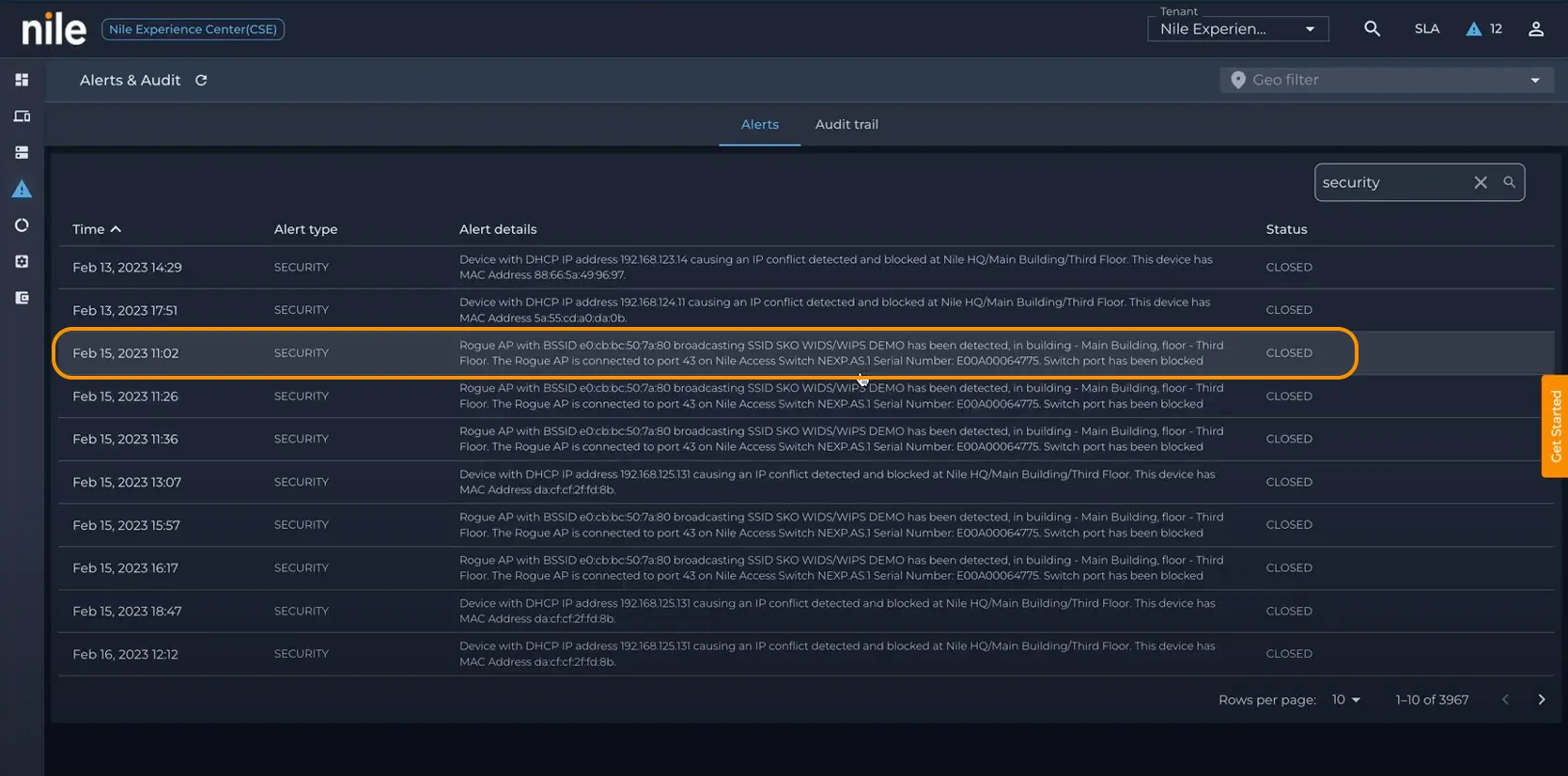
If a 3rd party Wi-Fi AP connected to the Nile Service Block is approved via the ALL rule in MAC Authentication By-pass, it will be detected, alerted, and blocked as in the example below. If this device type is approved via a specific MAC-address match, OUI, or Fingerprint match, Nile will only Alert (no port block-based mitigation will be applied)
Navigate to Nile Control Center >> Alerts >> search for Security events.

If the user navigates to the Nile Control Center >> Devices page, the 4th tile shows the overview of the clients detected under WIDS/WIPS
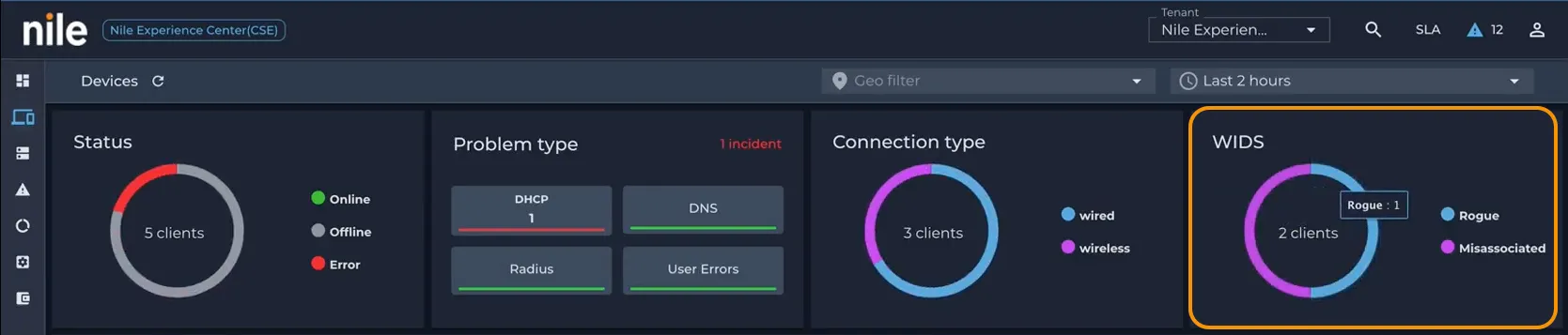
Clicking on the More Details will take the user to Rogue AP's 'Device Details' page. In the example below, a detailed list of events can be found. If Wi-Fi clients had connected to this Rogue AP, they would show up under the Misassociated device list.
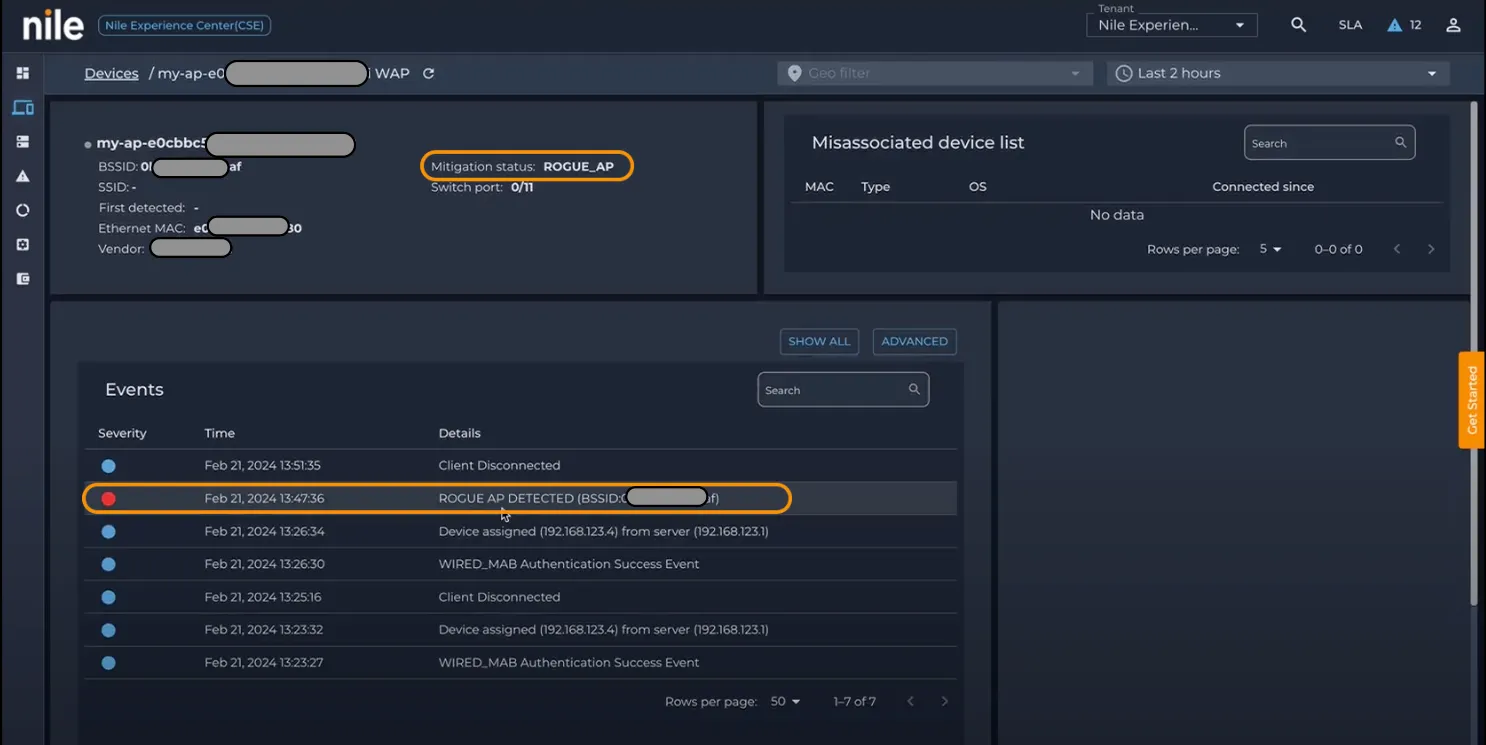
Rogue AP with NAT on wired port
As this is a Rogue AP, most likely it might NAT all the traffic out of its interface onto the Nile system. These are typically the Wi-Fi Routers used at home, available off the shelf. They have a port marked as WAN in most cases and plug into the home's internet connection. Thus, the interface usually NAT's all the traffic out. This introduces some challenges in reliably detecting the presence of a Wi-Fi Rogue AP on the Wired network, such as an office LAN. Nile uses some techniques to inspect the egress traffic on the WAN port connected to NSB.
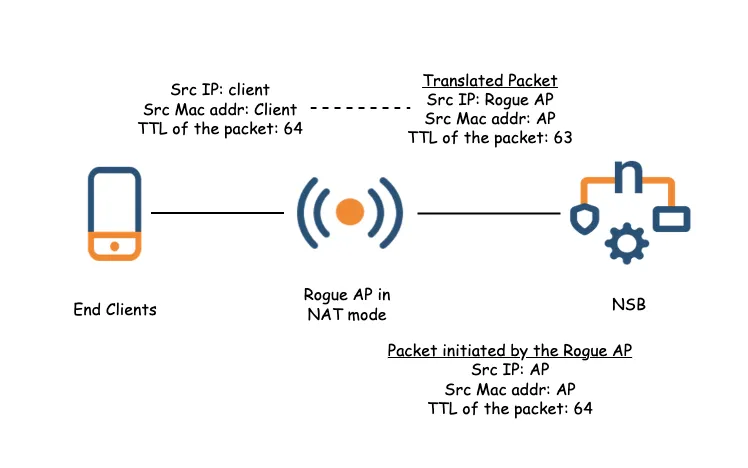
When the traffic is NAT'ed, even though the source MAC address and the IP address will be rewritten by the rogue AP, the NSB will see two packets with the same IP and MAC address with two different TTL values, and that confirms the detection of a Rogue AP. However, detecting the presence of a NAT on the wired devices port connected to NSB alone does not confirm that the device is a Wi-Fi AP. The monitoring data collected by Nile AP's monitoring radio reports all the BSSIDs seen in the air, as well as Wi-Fi Client mac-addresses that may have been associated with BSSIDs seen in the vicinity. All this data is processed in the cloud to further correlate the wired and wireless MAC addresses to establish a relationship between any wired mac-adddresses seen on the NSB and the Wi-Fi BSSIDs seen in the air. If a correlation is found, it can be confirmed that the device observed doing NAT on its wired port is also a Wi-Fi access point, in which case a 'Rogue AP detected' alert is generated, as in the example above.
Suspected Rogue AP
In some cases, it is non-trivial to correlate the wired MAC address of a device and wireless BSSIDs seen in the air. In many cases, the Ethernet MAC address may not have the same OUI or fall within a certain range of any of the wireless BSSIDs reported by Nile APs. Nile is unable to fully qualify such wired devices as 'Wi-Fi APs' and hence raises a 'Suspected Rogue AP' alert. The example below shows one such instance of a device that exhibited NAT behavior on its LAN traffic, but its nature as a Wi-Fi AP could not be confirmed. As a safety measure, Nile raises a suspected rogue AP alert for the customer's IT team to be aware of and inspect the devices once.
There are cases of laptops and workstations that may exhibit NAT-like behavior on their egress traffic due to the use of VPN clients, agents, or the use of Virtual Machines. Nile recognises that it may cause an inconvenient level of suspected rogue AP alert volume due to end devices exhibiting NAT behavior. Hence, Nile provides a functionality to 'Ignore' such devices from WIDS detection, to avoid false positive alerts. The ignore functionality is quite extensive, and it is covered in the sections below.

If the Rogue AP is not NAT'ing the traffic, based on the fingerprinting data and also by comparing the wired MAC address with the BSSID's broadcasting from the rogue AP, we will be able to detect them as a Rogue AP, and an alert is shown on the Nile Control Center.
Misassociated Clients
These are Wi-Fi devices that are detected as 'connected' to the Rogue AP's BSSID. This is done based on monitoring data reported by all Nile AP monitoring radios. This data contains BSSIDs seen in the vicinity, as well as end device MAC addresses that are seen as associated with the BSSIDs. When an end device Wi-Fi MAC is seen as associated with a Rogue AP BSSID, it is marked as a mis-associated client. In case of Wi-Fi APs that act in a bridge mode, the mis-associated Wi-Fi device MAC address is also seen on the wired port of the NSB, which further helps in collating misassociations.
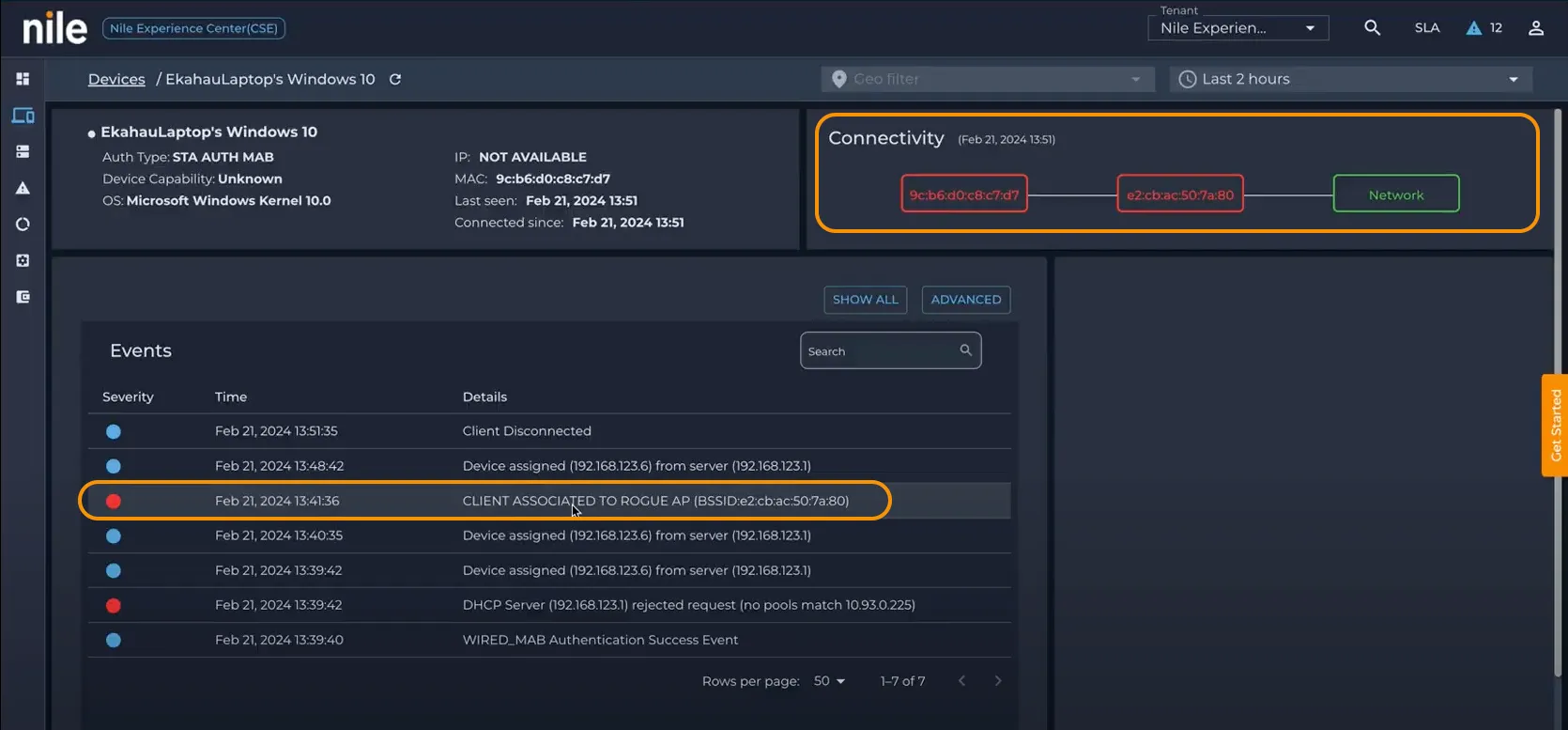
Honeypot and Evil Twin AP
A non-Nile AP broadcasting the same ESSID as an authorized Nile AP is detected as a ‘Honeypot’ impersonation attempt. These APs are defined as non-wired malicious APs that are impersonating an enterprise AP to lure clients to it as the first step to what’s to follow later. These are detected based on a mismatch found in the monitoring data where a non-Nile BSSID is seen advertising an SSID that belongs to the customer's active Nile AP.
In case of a malicious actor spoofing both the SSID and BSSID of a legitimate Nile AP, the WIDS detects this as an Evil Twin impersonation attempt and alerts based on sophisticated detection logic built around the same BSSID seen as active simultaneously from two sources.
Below are examples of a Honeypot alert and an Evil Twin alert
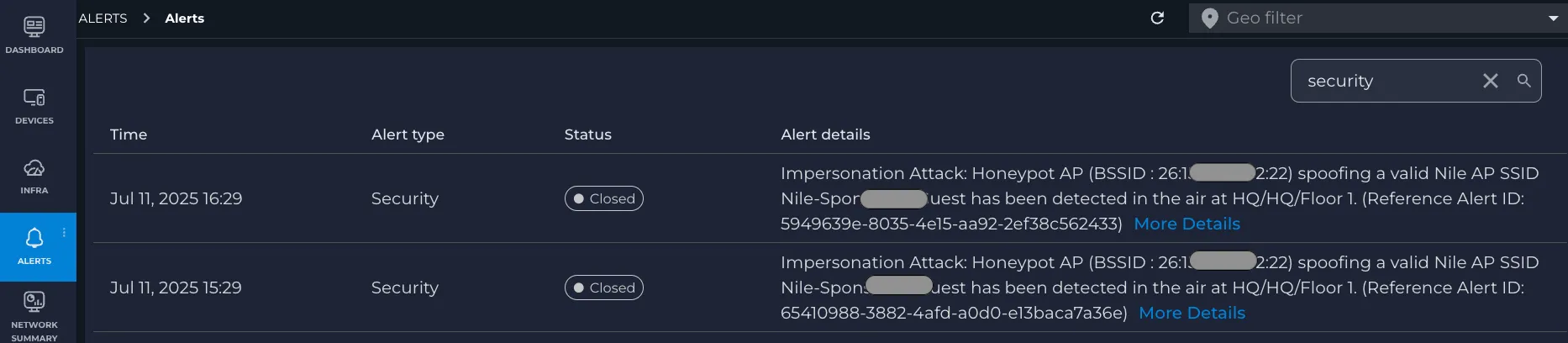

Denial of Service (DoS) attacks
Nile's WIDS currently detects DoS attacks of two types: 'broadcast deauthentication and disassociation' attempts detected as a flood from Nile BSSID, which seems unusually higher than normal. Broadcast deauthentication or disassociation packets are unusual in Wi-Fi networks these days. Alerts can be found under Nile Control Center > Alerts
The alert also specifies which Nile APs on the floor have reported the monitoring data that assisted in detecting the DoS attempt. This helps customer IT teams to check the area around the reporting AP in the alert.

Second is 'unicast broadcast deauthentication and disassociation' attempts seen as a flood from the Nile BSSID to a Wi-Fi client mac-address or vice-versa, which seems unusually higher than normal. These attempts are alerted for in the Nile Control Center for the customer IT team's awareness and action, to check for any suspicious injectors, unidentified Wi-Fi devices in the vicinity that may be spewing these DoS floods over the air
The alert also specifies which Nile APs on the floor have reported the monitoring data that assisted in detecting the DoS attempt. This helps customer IT teams to check the area around the reporting AP in the alert.

Mitigate (Rogue AP only)
Rogue AP: After a successful detection of a Rogue AP, the NSB will take the following actions so that the AP will not be able to pass any traffic:
- Shut down the wired port on the Access switch where the Rogue AP is detected.
- Change the MAB rule on the Nile Control Center from approved to denied
- Send an alert to the customer via email/webhook if they have subscribed to it.
- Any mis-associated Wi-Fi MAC addresses are also added to the MAB as denied and disconnected
There is no mitigation for Honeypot, evil twin, or DoS attacks. Only alerts are sent to the Nile Control Center, and notifications are generated via email or webhook if the customer IT team has set up a subscription to the notification. It is highly recommended to subscribe to notifications for alerts.
Excluding Trusted Device from WIDS
Customers may have ‘approved’ external Wi-Fi APs plugged into the NSB that should not trigger rogue alerts. Similarly, end-user devices can match ‘suspected rogue’ signatures—commonly due to TTL changes from workstations running VMs or VPN clients. In brownfield environments, incumbent APs often remain active, leading to SSID overlap between Nile and non-Nile APs, which is expected. All these lead to rogue, suspected rogue, and honeypot alerts, respectively.
Nile has introduced controls where customers can mark an OUI and/or MAC address of a device to be ignored from rogue and honeypot detection and alerting. This provides complete control over alert volume that may be caused by known legitimate devices that the customer deems safe.
Excluding devices from Rogue AP detection and alerting
As mentioned in a previous section:
- Only devices approved via the ‘ALL’ rule in MAB will be treated as less safe and go through WIDS mitigation if detected as rogues
- Devices approved via a specific MAC address, OUI, or fingerprint match will be run through the WIDS check, but only alerted for (not mitigated).
- This ensures that customers who have legitimate use for certain wireless access points or wireless bridges on their network can migrate smoothly to Nile and continue operating. These devices may exhibit Rogue AP-like signatures, but Nile will only alert for these as a security measure.
There are various options to mark a MAC address to be ignored from the WIDS Rogue check, either through the alert or access management options
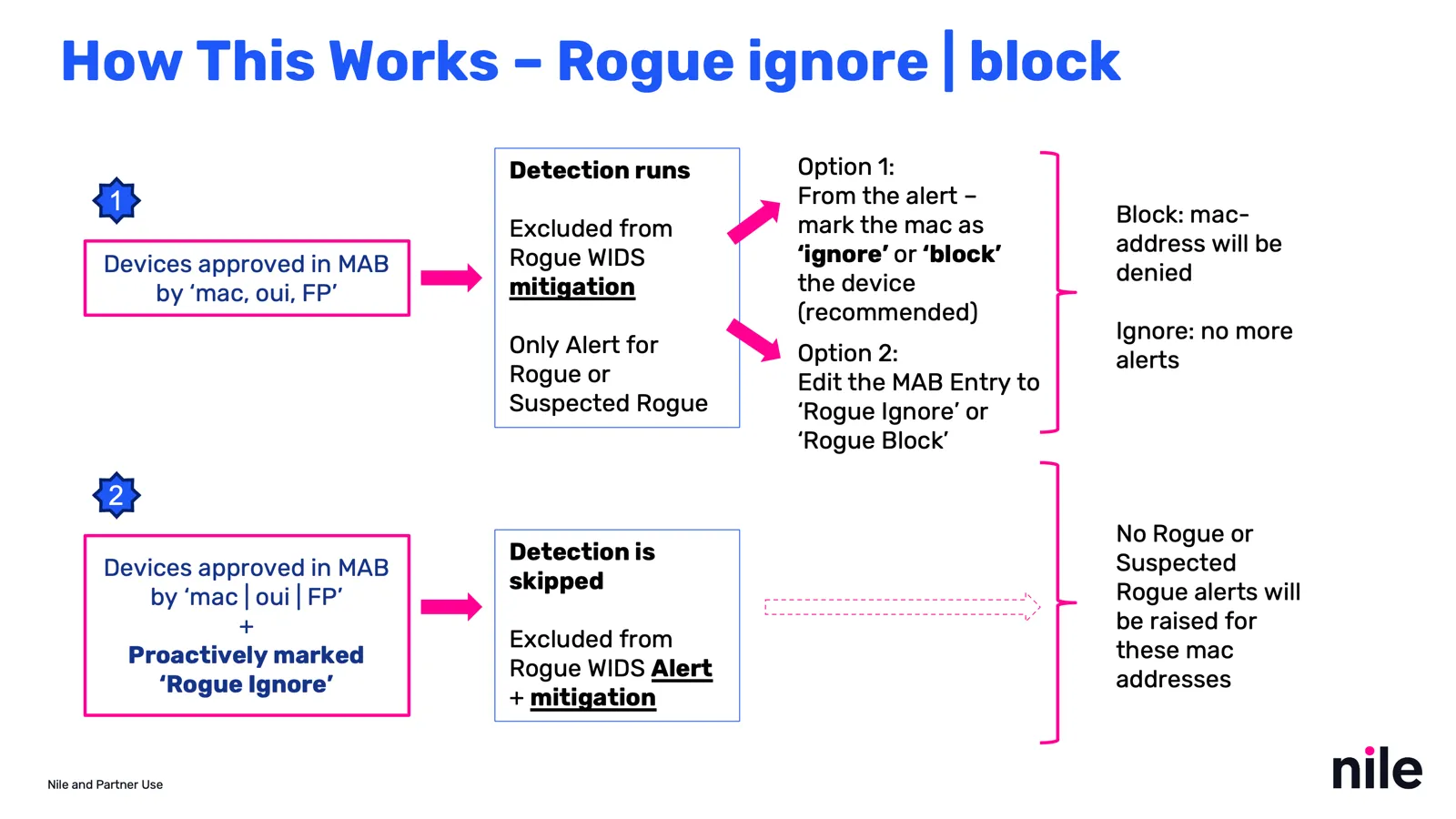
Admins can use MAB proactively – Ideal for new onboarding, migration to Nile
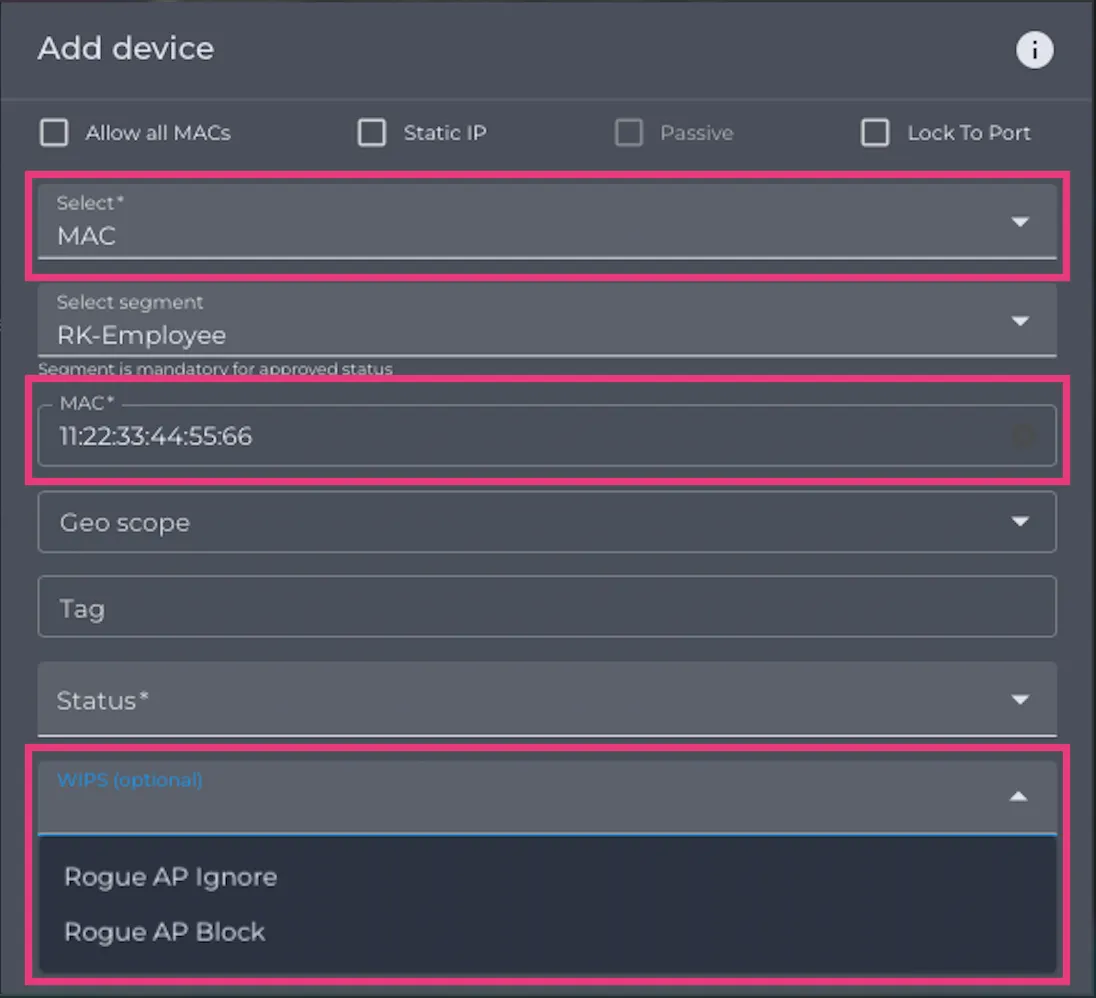
- Admins can add a MAC through Network Setup > Access Management > Wired
- Select the relevant options that are mandatory based on selection (e.g., approved device mandates a segment selection)
- Choose Rogue AP ignore or block
- Ignore will exclude the device matching the rule from Rogue WIDS – no alerts, no mitigation
- Block will perform the WIDS mitigation action
Rogue AP ignore and block only supports MAC address.
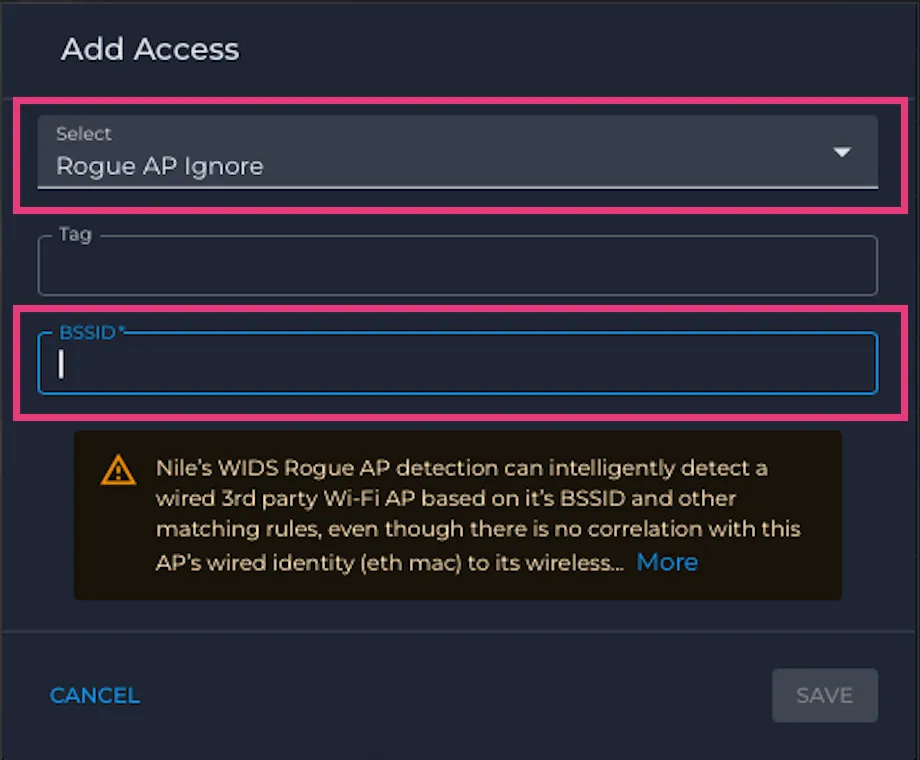
Admins can use Wireless access mgmt proactively – Ideal for new on-boarding, migration to Nile
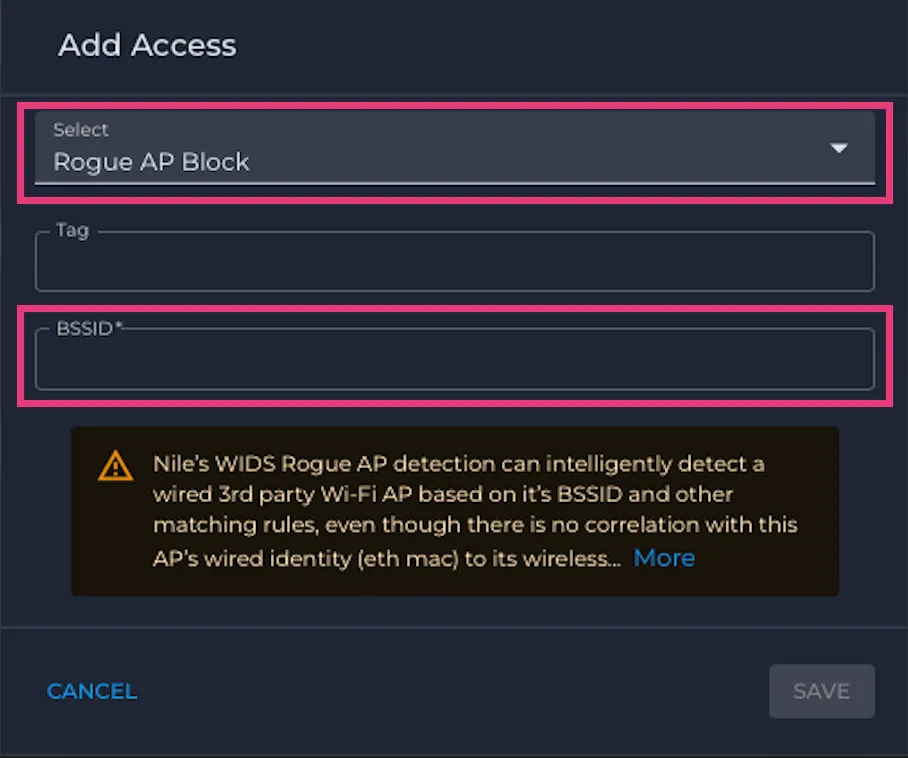
Understanding the BSSID-based Rogue detection is important in order to use the ignore from WIDS functionality through the 'Wireless Access Management'. Nile’s WIDS Rogue AP detection can intelligently detect a wired 3rd party Wi-Fi AP based on its BSSID and other matching rules, even though it may not be possible to correlate this AP’s wired identity (Ethernet MAC) to its wireless identity (wireless MAC/BSSID). In such cases, admins can choose to exclude certain BSSIDs from WIDS. This is done through the access management page for Wireless
This is NOT a recommended option since BSSIDs can be hard to find beforehand. Instead, use the ignore/block option from the Rogue AP alert that specifies it was BSSID-based Rogue detection. An example of a rogue AP alert detected based on BSSID is below. This is an example of a Rogue AP detected based on correlation of monitoring data, where WIDS could tell there is a Wi-Fi AP connected to a port on the NSB; however, its wired Ethernet MAC address could not be correlated to the AP's BSSID. Nonetheless, with a good degree of confidence, it could be inferred that the rogue AP is indeed connected to the NSB over LAN.

- Admins can proactively add wireless BSSID MAC to be ignored or blocked from WIDS; Access management > Wireless
- This option applies to ignoring or blocking ‘wired rogue APs’ based on their BSSIDs/wireless MACs
- Ignore will exclude the devices matching the rule from Rogue WIDS – no alerts, no mitigation
- Block will perform the WIDS mitigation action
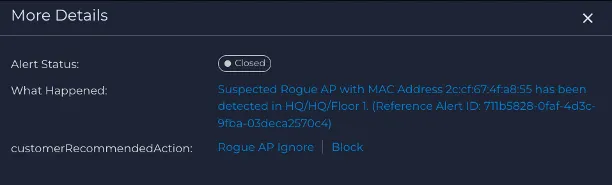
Admins can take action from the Suspected Rogue and Rogue AP Alert
The example below illustrates how a MAC address can be ignored from WIDS detection and alerting. The same applies to both a suspected rogue AP alert and a rogue AP alert.
Clicking on the More Details from a suspected rogue or rogue AP alert will open a drawer with the option to 'Ignore' or 'Block' the MAC address of the device shown in the alert

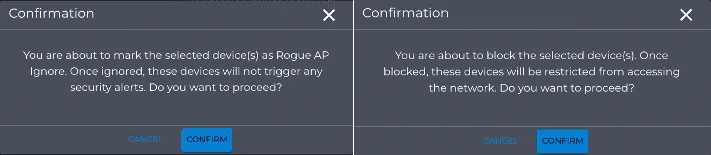
The option to ignore or block will present the user with a warning pop-up, acknowledging that it will add the MAC address to either the ignore list from WIDS or block it. The status of the MAC address can be seen under the Access Management > Wired tab under Network Setup
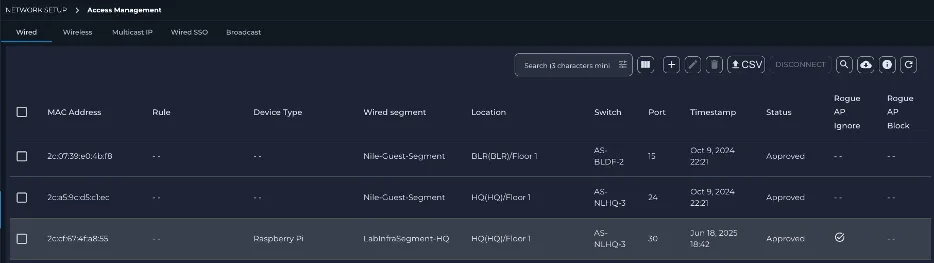
The columns to show whether a MAC address has been ignored from rogue AP detection or blocked by rogue AP detection are hidden by default on the MAB access management page. Choose the hidden column selection and enable the Rogue AP ignore and Rogue AP block columns to be made visible. The relevant action taken on the MAC address will be displayed as follows.
Excluding devices from Honeypot AP detection and alerting
Admins can use Wireless Access Management proactively, under Network Setup > Access Management > Wireless
- Admins can add wireless BSSID/OUI to be ignored from the WIDS Honeypot check
- Ignore will exclude the devices matching the rule from WIDS honeypot checks – no honeypot alerts will be generated for APs with those OUIs or BSSIDS, even when found with overlapping SSIDs, the same as an activated Nile AP
- This is ideal for brownfield customers with legacy APs still active in the vicinity of Nile APs
It is recommended to use OUI to ignore WIDS Honeypot detection, to avoid adding individual MAC addresses seen from the incumbent APs
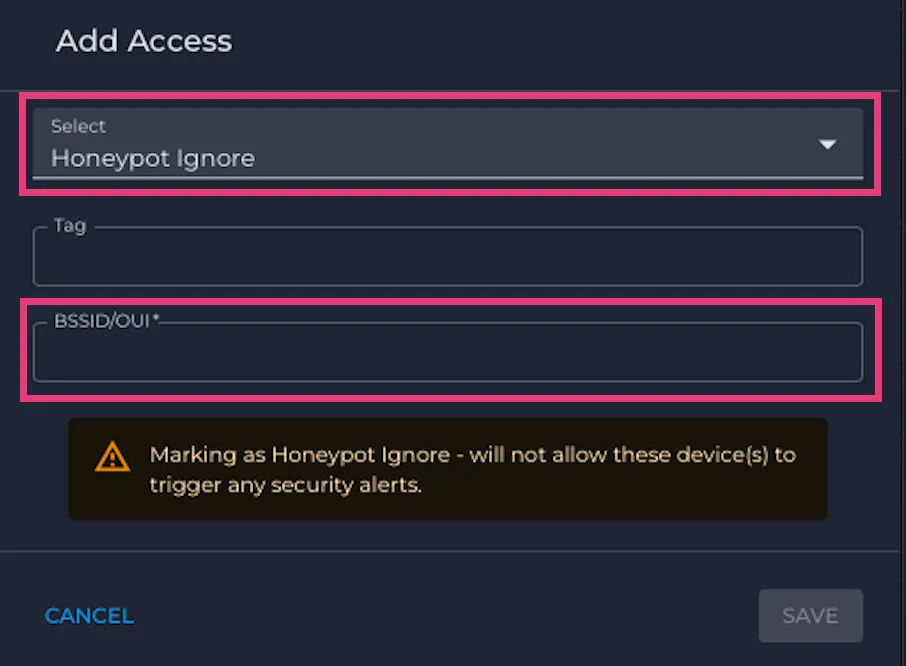
Admins can take action from the Honeypot Alert
Clicking on the More Details from a Honeypot AP alert will open a drawer with the option to 'Ignore' the MAC address of the device shown in the alert

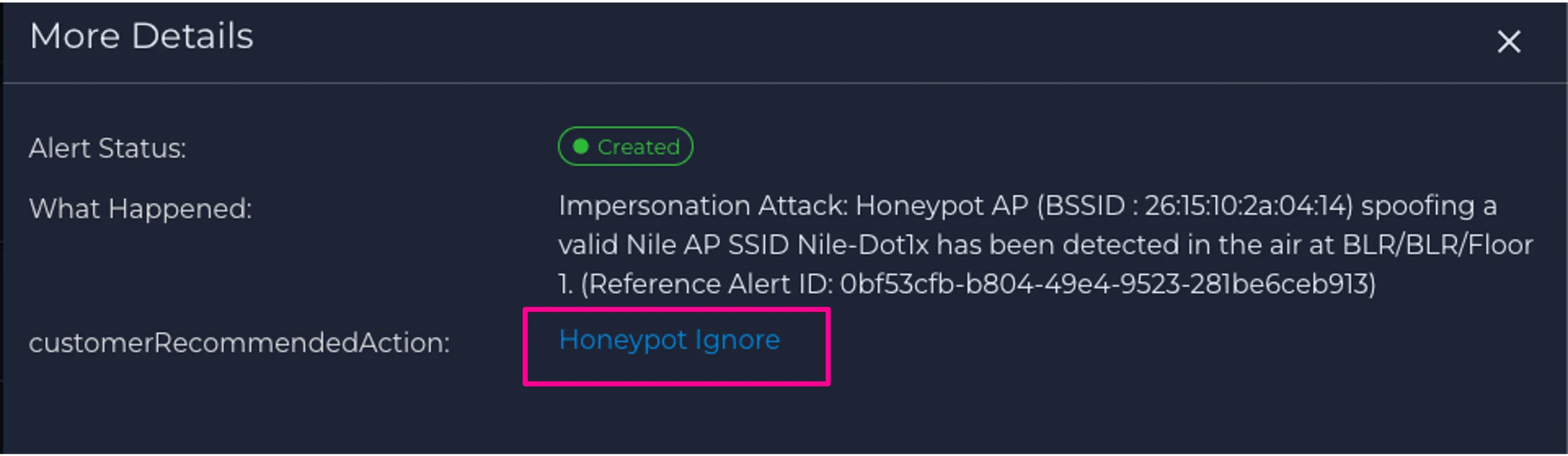
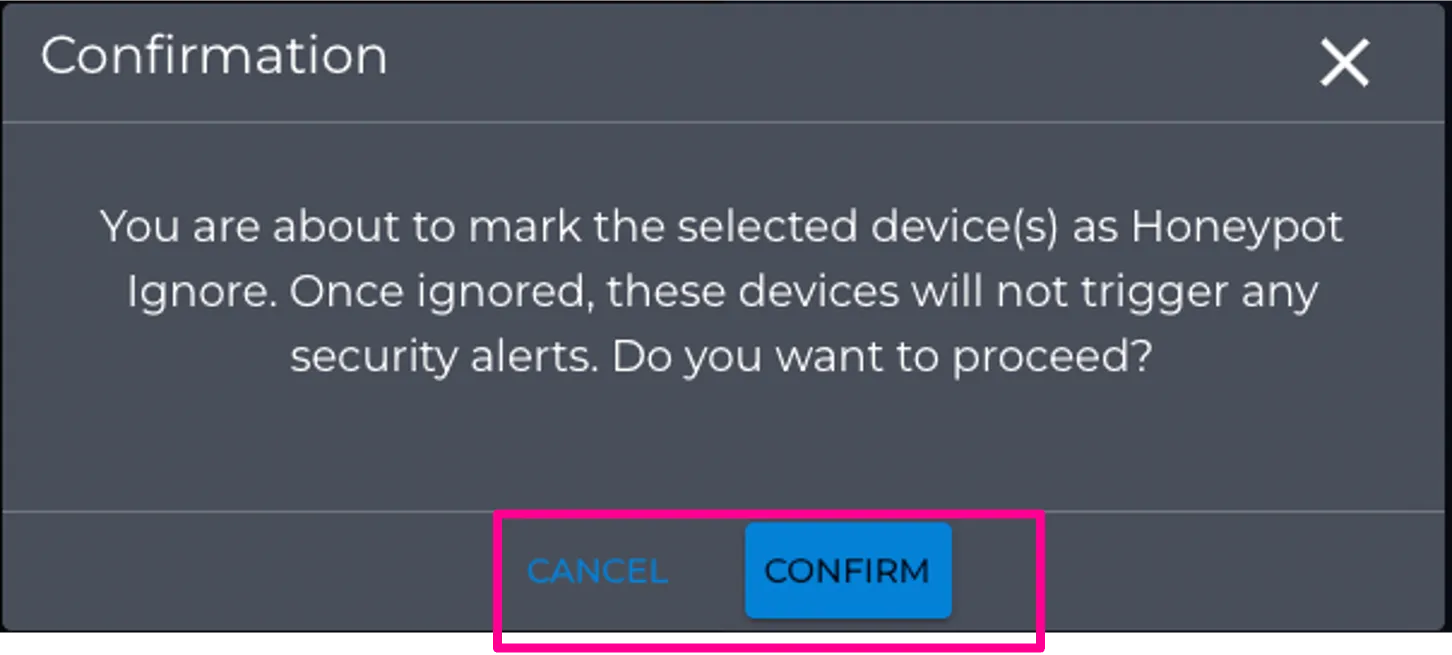
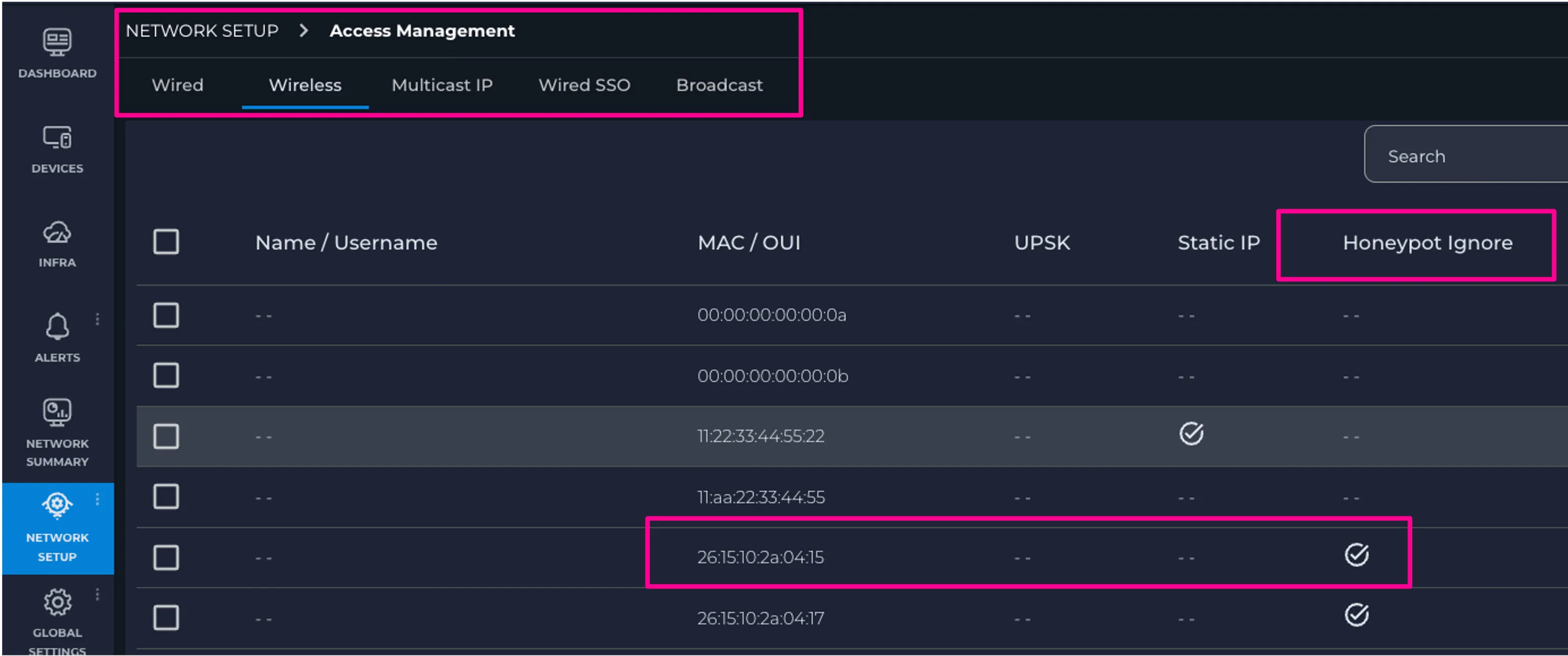
The option to ignore will present the user with a warning pop-up, acknowledging that it will add the MAC address to the ignore list from WIDS honeypot detection. The status of the MAC address can be seen under the Access Management > Wireless tab under Network Setup
The Honeypot Ignore status column is hidden by default. Choose the column selector to add the Honeypot Ignore column to view the status of the MAC addresses that have been ignored from WIDS honeypot AP detection
Honeypot Exclusions
Use Honeypot Exclusions to prevent trusted wireless devices from generating repeated honeypot alerts.
A honeypot exclusion applies to a wireless BSSID or OUI. Once added, devices matching that BSSID or OUI are excluded from WIDS honeypot checks, so honeypot alerts are no longer generated.
When to use this
Use this feature when you know a neighboring or legacy AP is legitimate and should not continue triggering honeypot alerts, especially in brownfield environments where non-Nile APs may still be active near deployed Nile APs.
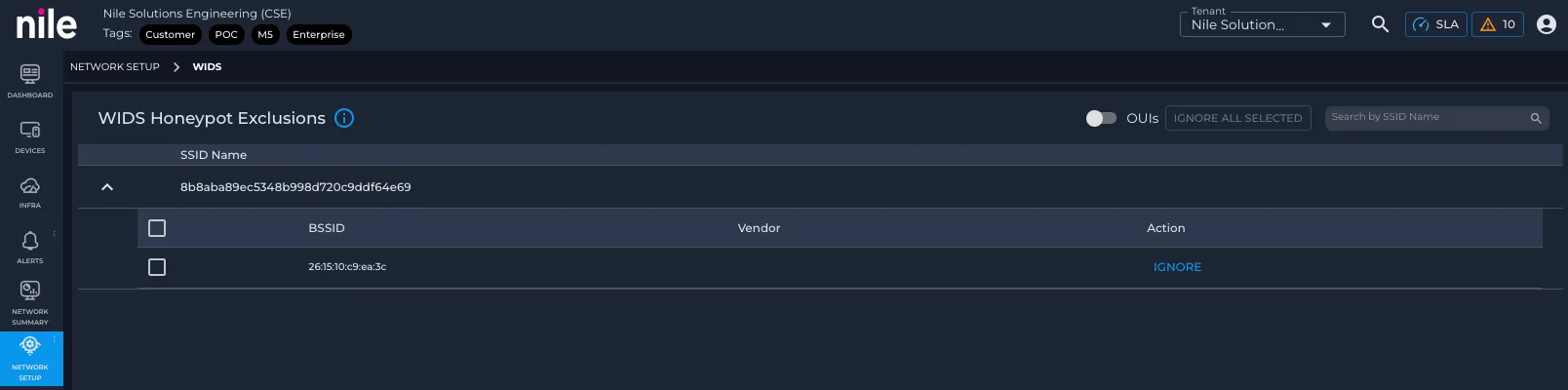
Navigate to Honeypot Exclusions
- Sign in to Nile Portal.
- In the left navigation, go to Network Setup.
- Select WIDS.
- Open the WIDS Honeypot Exclusions section.
Ignore identified Honeypots
- In WIDS Honeypot Exclusions, review the list of BSSIDs and OUIs already identified as honeypots.
- Select the entries that you have validated that can be safely ignored.
- Enable ignore for the selected BSSIDs or OUIs.
What happens next
After the exclusion is saved, Nile skips honeypot alerting for matching devices. No new honeypot alerts are generated for APs with the excluded BSSID or OUI, even if they advertise an SSID that overlaps with an active Nile AP.
Best practice
Add exclusions only for devices you trust and have validated as expected in the environment. This keeps alert noise low while preserving meaningful WIDS visibility for unknown devices.