Cato Sockets integration with Nile
This document describes the steps to integrate Cato Networks Socket X1600 SD-WAN appliances in a redundant configuration with the Nile Service Block (NSB) using BGP as the routing protocol. The goal is a seamless integration between the Nile Access Service and the customer’s extended network and internet, with ECMP-style redundancy across four independent /30 L3 transit links.
Prerequisites
- Cato Networks
- A Cato site with Sockets and administrative access to the Cato management portal (Network > Sites > Site Configuration).
- Cato site AS number: 65001 (Cato ASN).
- Customer/NSB AS number: 65002 (peer ASN on Cato side).
- IP addressing
- Four unique /30 point‑to‑point subnets for NSB–Cato transit (example values used in this guide):
- 192.168.10.0/30 – NSB GW1 ↔ Cato Socket (native on GW1 port)
- 192.168.10.4/30 – NSB GW1 ↔ Cato Socket (sub‑interface)
- 192.168.10.8/30 – NSB GW2 ↔ Cato Socket (native on GW2 port)
- 192.168.10.12/30 – NSB GW2 ↔ Cato Socket (sub‑interface)
- Routing design
- BGP is used between each NSB gateway and the Cato Socket over two parallel /30 links, resulting in 4 total BGP sessions and up to 4 equal‑cost paths for Nile–Cato traffic.
- Cato advertises a default route (0.0.0.0/0) to NSB; NSB advertises all NSB and downstream user subnets to Cato.
Topology
Two Nile gateways connect to a single Cato Socket X1600 over dedicated LAN ports. Each physical NSB–Cato connection is split into two logical /30 networks (native + direct “sub‑interface”), giving four independent L3 transit segments.
High‑level topology
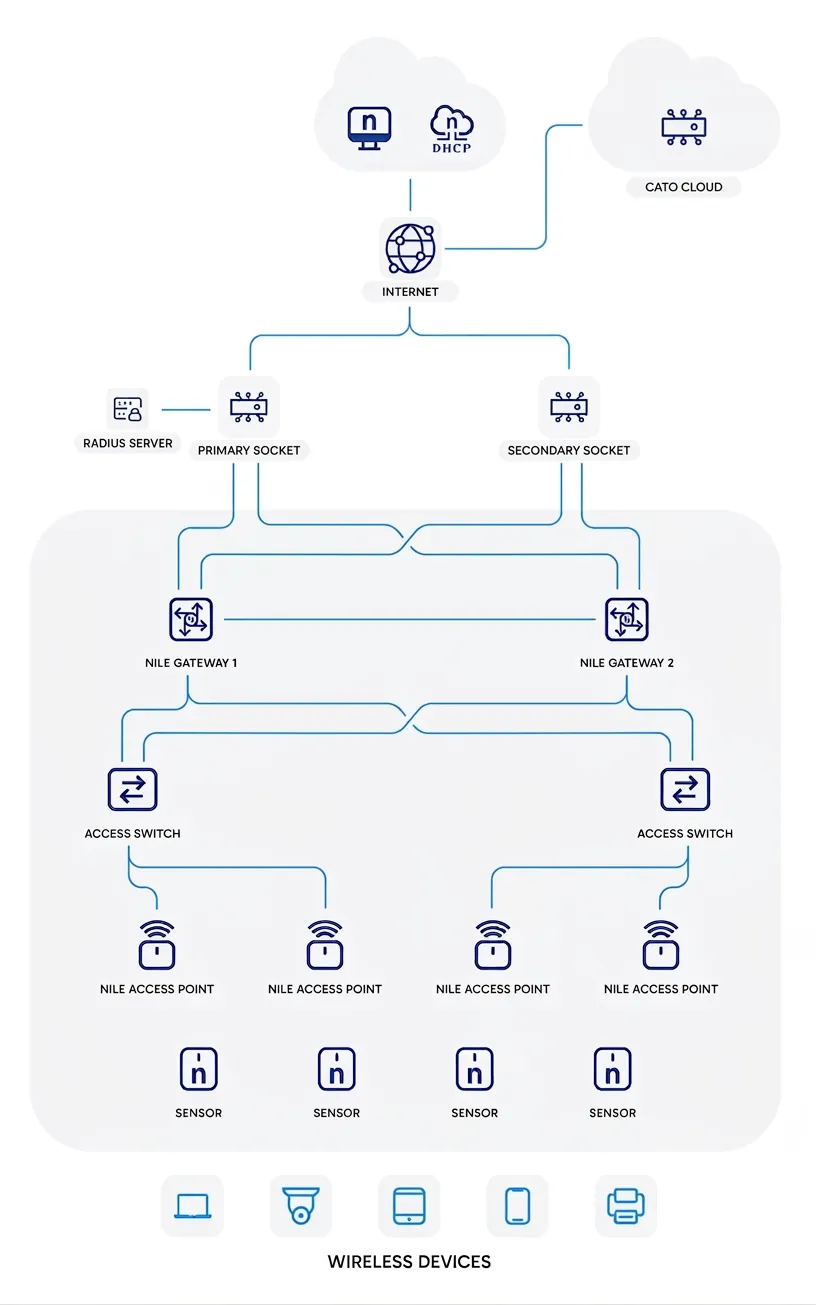
Traffic between Nile gateways and Cato uses all available /30 transit links. If any link or gateway fails, the remaining BGP sessions continue to carry traffic.
IP and BGP Design
Transit IP plan
Link ID | Nile Gateway | Cato Network Object | Subnet | NSB IP (Peer) | Cato IP (Local) |
|---|---|---|---|---|---|
L1 | NSB GW1 | NSB GW1 (Native) | 192.168.10.0/30 | 192.168.10.2 | 192.168.10.1 |
L2 | NSB GW1 | NSB GW1_2 (Direct) | 192.168.10.4/30 | 192.168.10.6 | 192.168.10.5 |
L3 | NSB GW2 | NSB GW2 (Native) | 192.168.10.8/30 | 192.168.10.10 | 192.168.10.9 |
L4 | NSB GW2 | NSB GW2_2 (Direct) | 192.168.10.12/30 | 192.168.10.14 | 192.168.10.13 |
The Cato side configuration reflects these as Native and Direct IP ranges for the NSB GW1/GW2 network.
BGP sessions
On the Cato side, configure four neighbors (one per /30):
Neighbor Name | NSB GW | NSB ASN (Peer) | Cato ASN | Peer IP (NSB) | Cato IP (auto from network) | Advertise | Accept |
|---|---|---|---|---|---|---|---|
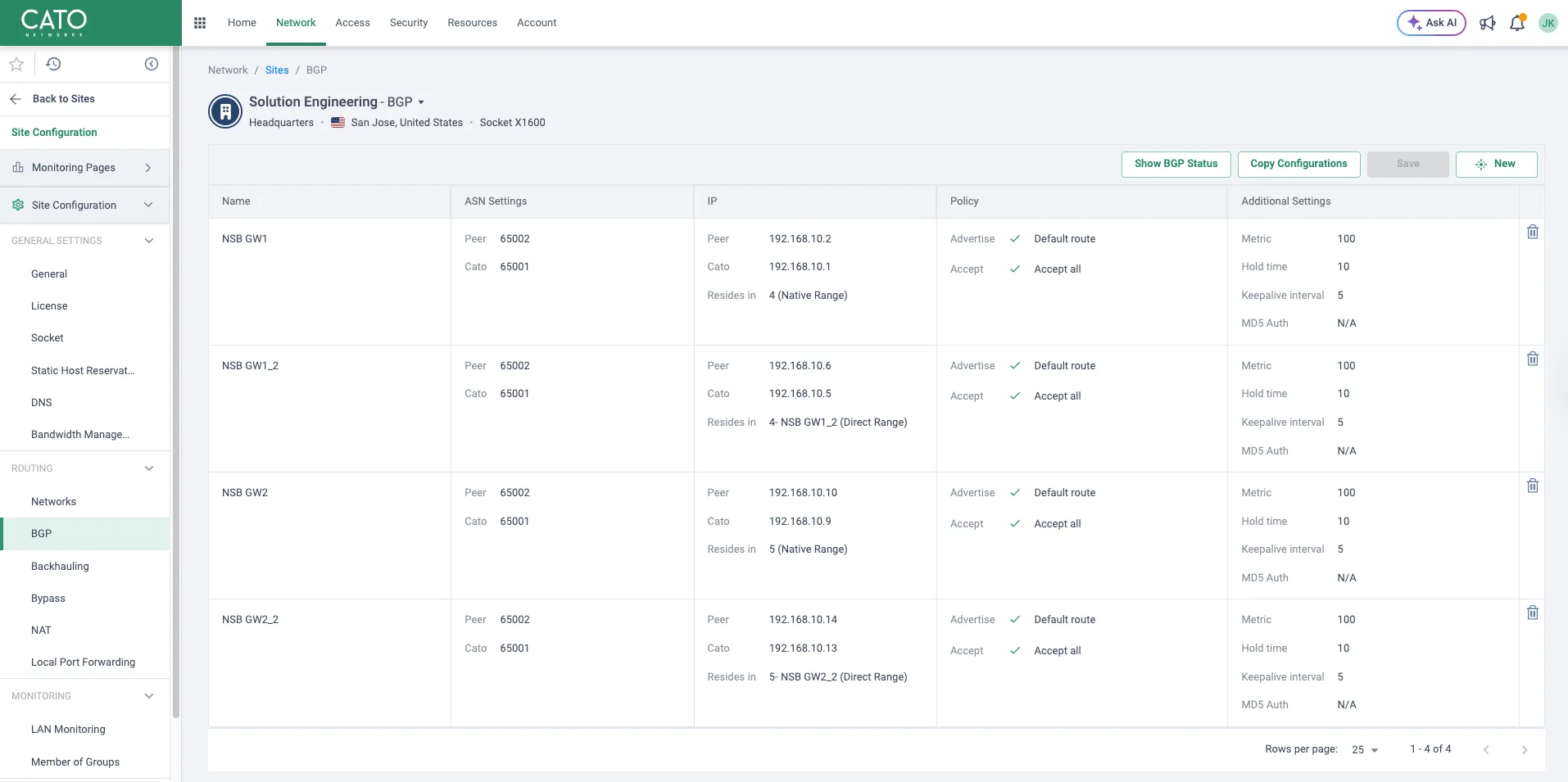
NSB GW1 | GW1 | 65002 | 65001 | 192.168.10.2 | 192.168.10.1 | Default route | Accept all |
NSB GW1_2 | GW1 | 65002 | 65001 | 192.168.10.6 | 192.168.10.5 | Default route | Accept all |
NSB GW2 | GW2 | 65002 | 65001 | 192.168.10.10 | 192.168.10.9 | Default route | Accept all |
NSB GW2_2 | GW2 | 65002 | 65001 | 192.168.10.14 | 192.168.10.13 | Default route | Accept all |
Additional BGP settings use:
- Metric: 100
- Hold time: 10 seconds
- Keepalive interval: 5 seconds
- MD5 Auth: disabled
Cato Socket Configuration
1. Configure Socket interfaces for NSB transit
On the Cato portal:
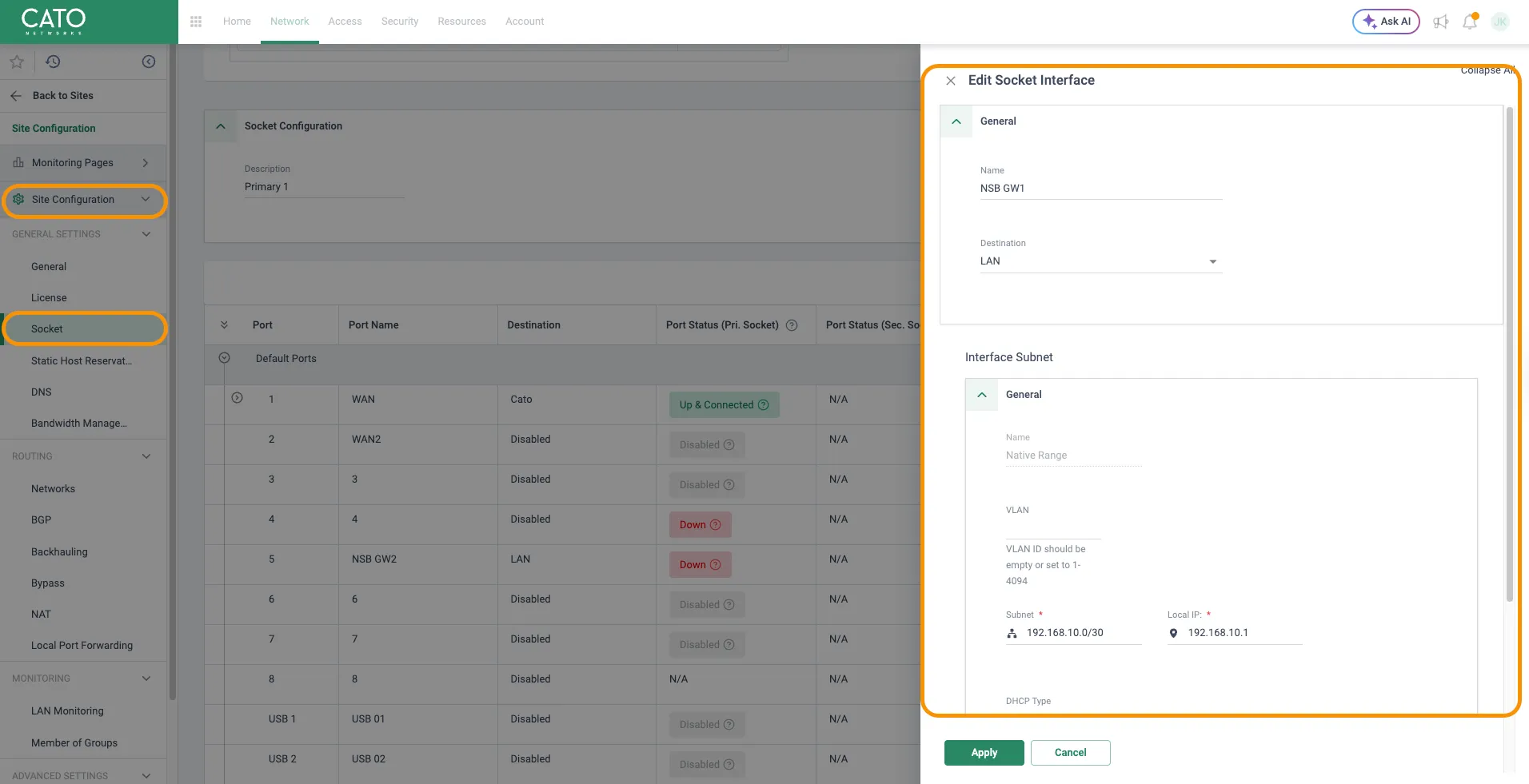
- Navigate to Network > Sites > Your Site > Site Configuration > Socket.
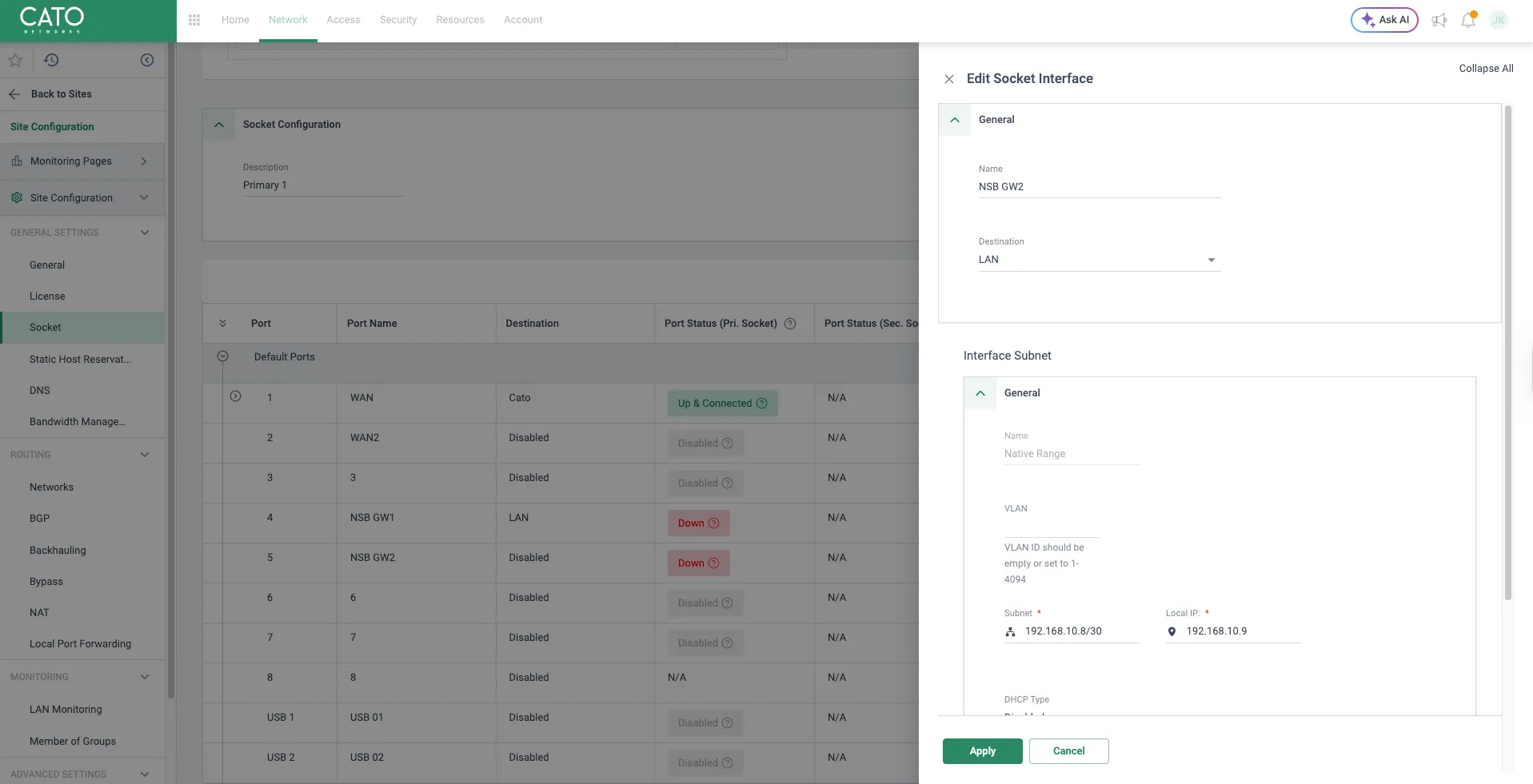
- Edit the ports connected to Nile gateways (e.g., Port 4 = NSB GW1, Port 5 = NSB GW2).
- For each port:
- Destination: LAN
- Interface Subnet (Native Range):
- NSB GW1 port: Subnet 192.168.10.0/30, Local IP 192.168.10.1
- NSB GW2 port: Subnet 192.168.10.8/30, Local IP 192.168.10.9
- DHCP: disabled.
In the UI, this appears as editing the Socket interface with a native /30 range and local IP on the Cato side.
The Socket interface for NSB GW1 is shown in the following images:
The Socket interface for NSB GW2 is shown below:
2. Define NSB transit networks and sub‑interfaces
Next, define the logical networks associated with these interfaces.
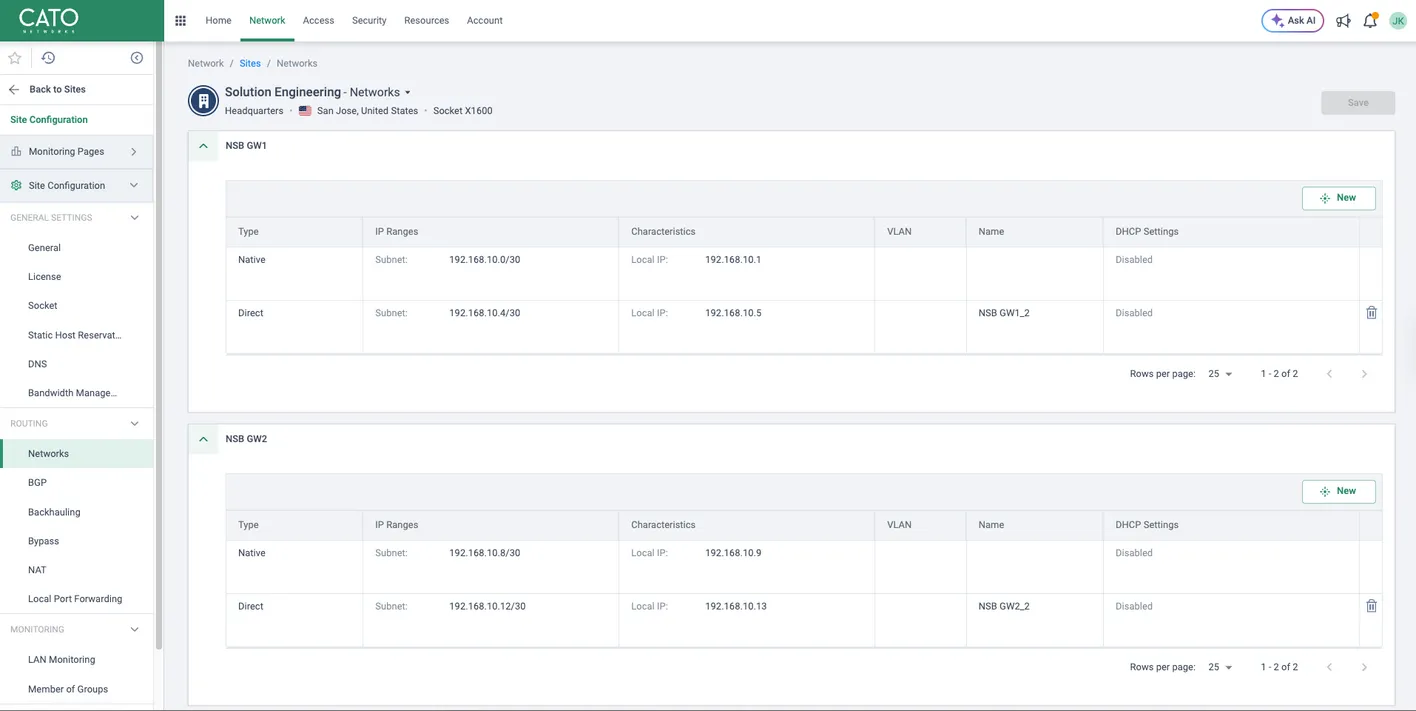
- Go to Network > Sites > Networks.
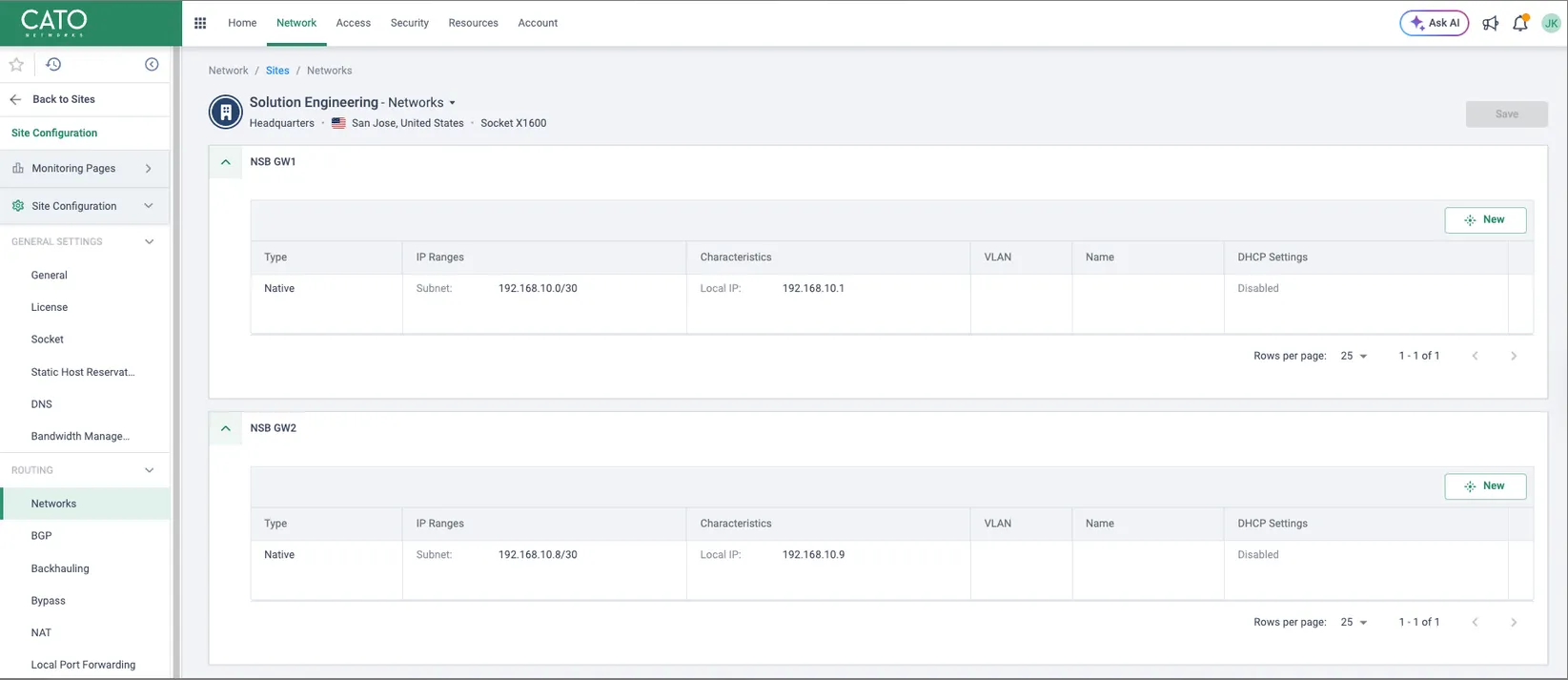
- Under NSB GW1, create/verify:
- Native range: 192.168.10.0/30, Local IP 192.168.10.1 (already created by the Socket interface).
- Direct range NSB GW1_2:
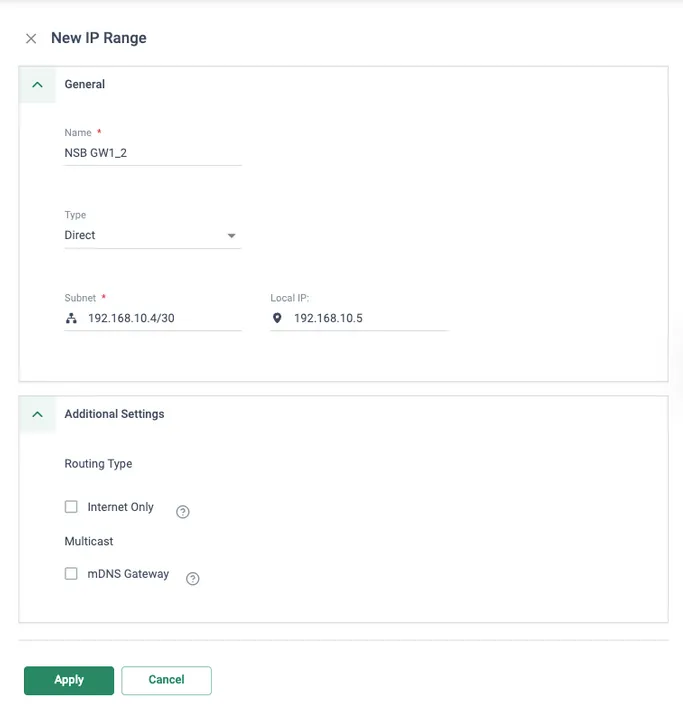
- Type: Direct
- Subnet: 192.168.10.4/30
- Local IP: 192.168.10.5
- Under NSB GW2, create/verify:
- Native range: 192.168.10.8/30, Local IP 192.168.10.9.
- Direct range NSB GW2_2:
- Type: Direct
- Subnet: 192.168.10.12/30
- Local IP: 192.168.10.13
3. Configure BGP neighbors toward NSB
- Navigate to Network > Sites > BGP.
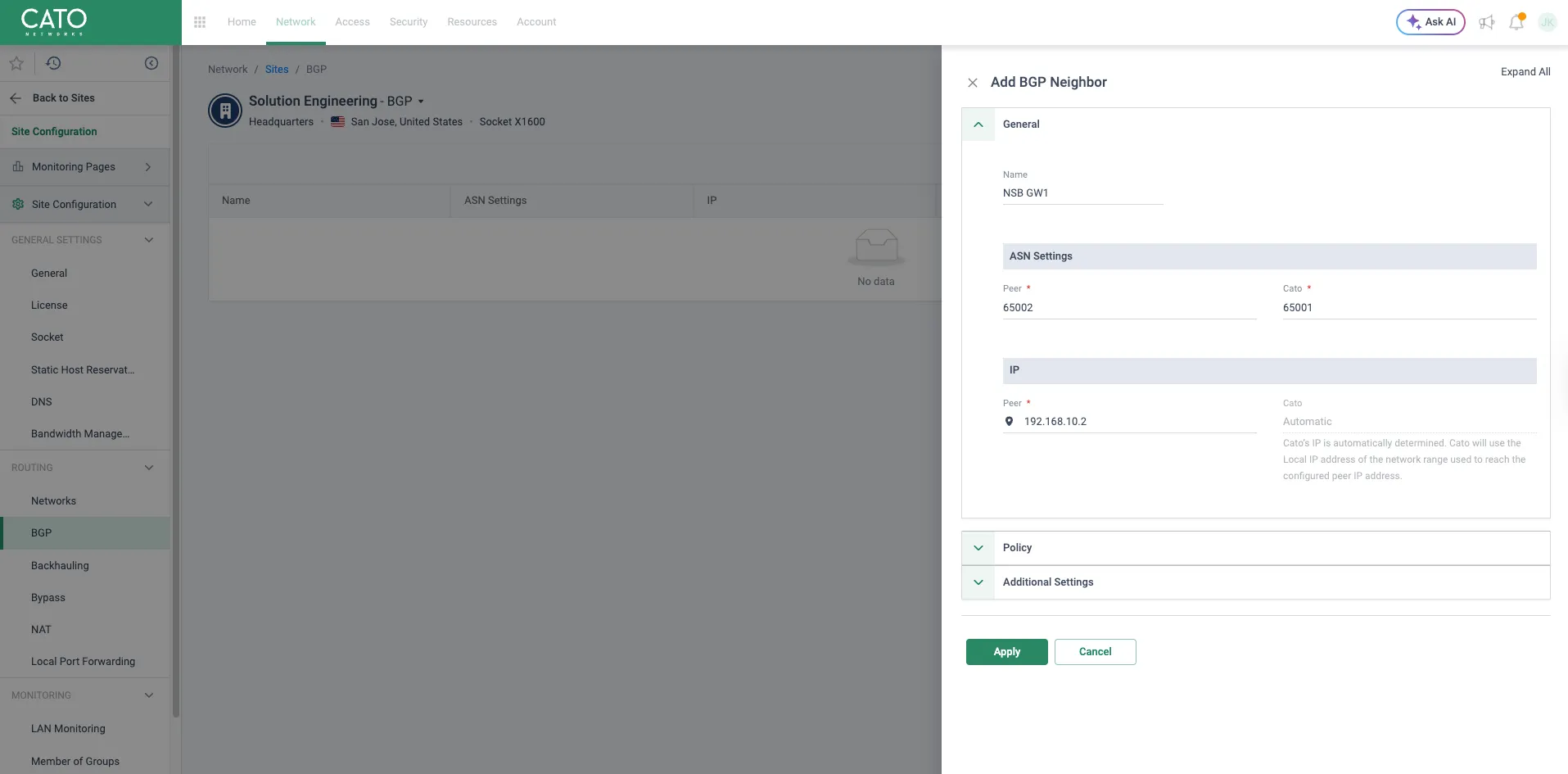
- Click New to add a BGP Neighbor (Figure 6).
- Under General:
- Name: NSB GW1, NSB GW1_2, NSB GW2, NSB GW2_2 (one neighbor per /30).
- ASN Settings:
- Peer: 65002 (NSB ASN)
- Cato: 65001
- IP > Peer: set to the NSB IP on that /30 (192.168.10.2, 192.168.10.6, 192.168.10.10, 192.168.10.14, respectively).
- Under Policy:
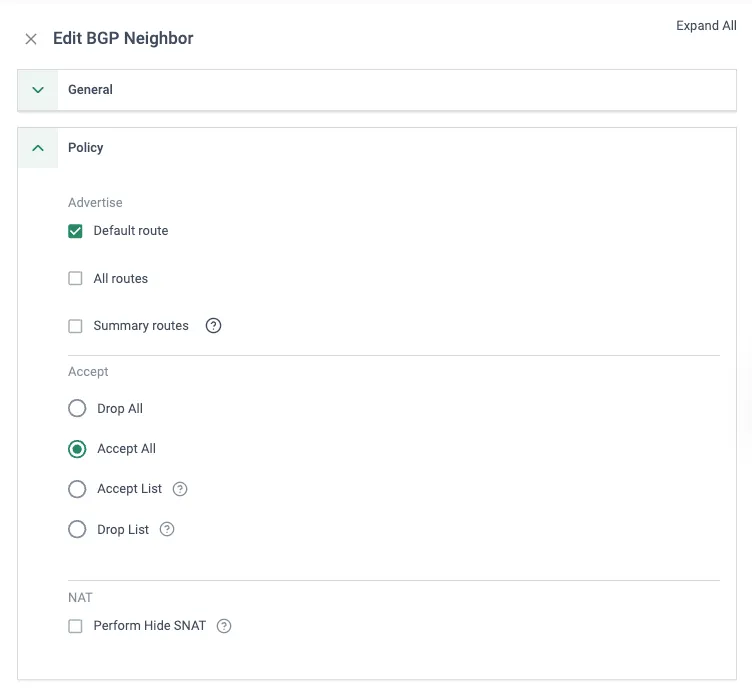
- Advertise: select the default route.
- Accept: Accept All.
- Leave Perform Hide SNAT unchecked (routing is handled via the transit /30s and NAT policy separately).
- Under Additional Settings:
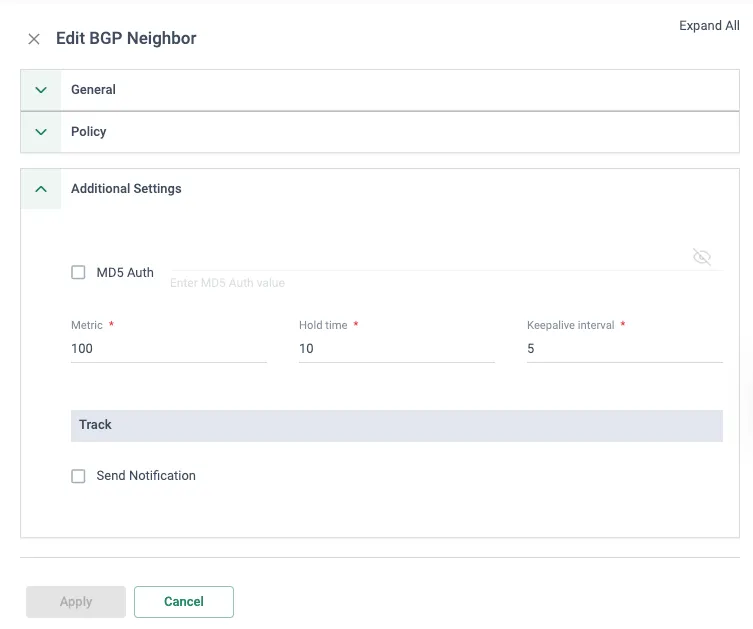
- Metric: 100
- Hold time: 10
- Keepalive interval: 5
- MD5 Auth: disabled (leave unchecked unless you configure matching MD5 on NSB).
- Repeat for all four neighbors so that the BGP summary table resembles the image below
4. Configure NAT for LAN to WAN traffic
If NSB traffic should reach the internet via Cato’s breakout, configure a NAT rule:
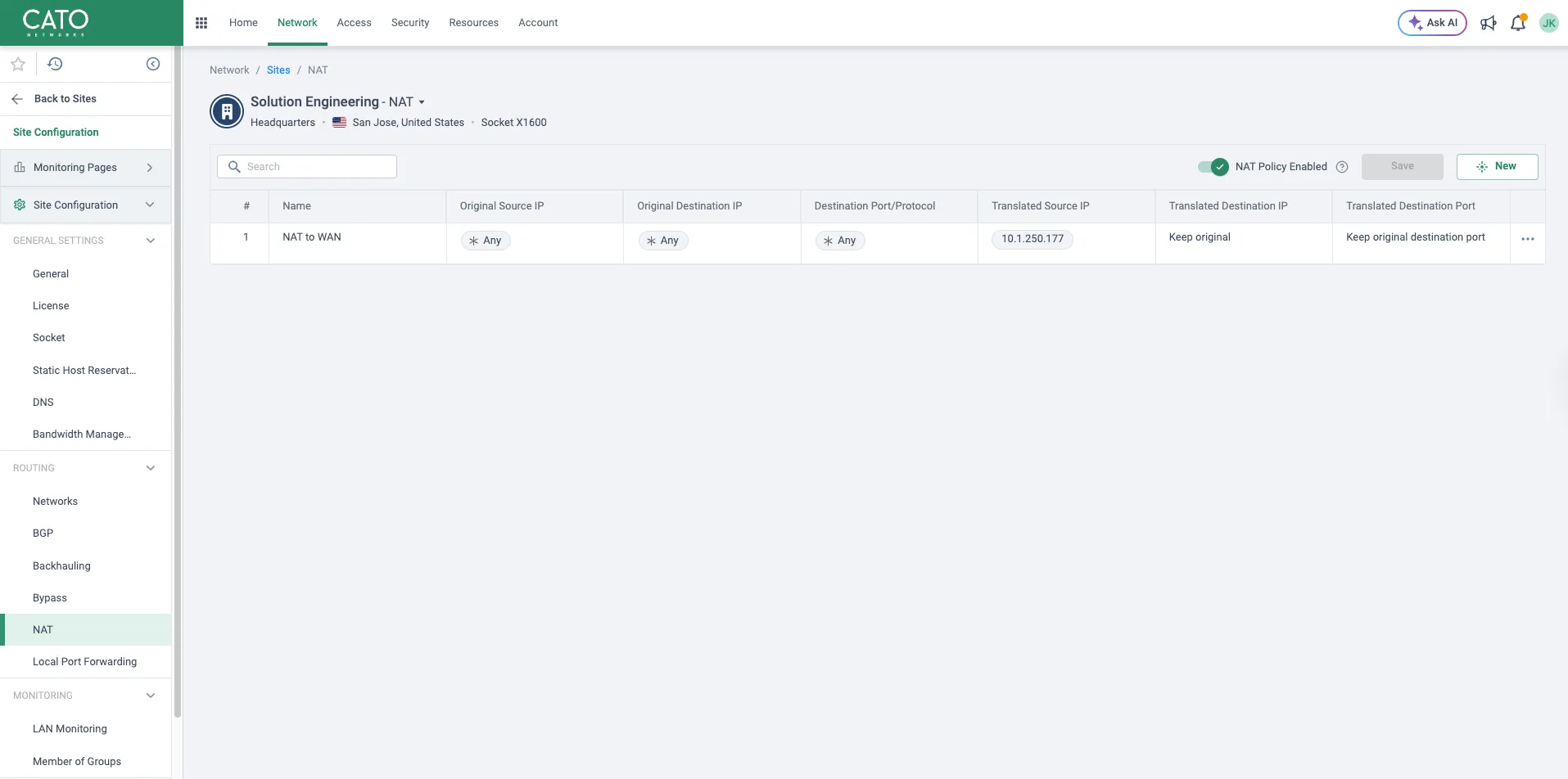
- Go to Network > Sites > NAT.
- Create a rule similar to “NAT to WAN”:
- Match: any source/destination/protocol (or constrain as needed).
- Translated Source IP: the public or internal egress IP allocated by Cato (example: 10.1.250.177).
5. Configure Bypass rules for NSB and Nile Sensor traffic
To ensure NSB transit and Nile sensor traffic is forwarded as pure L3 routed traffic (not subject to additional inspection or optimization within Cato Cloud PoP), configure Bypass rules:
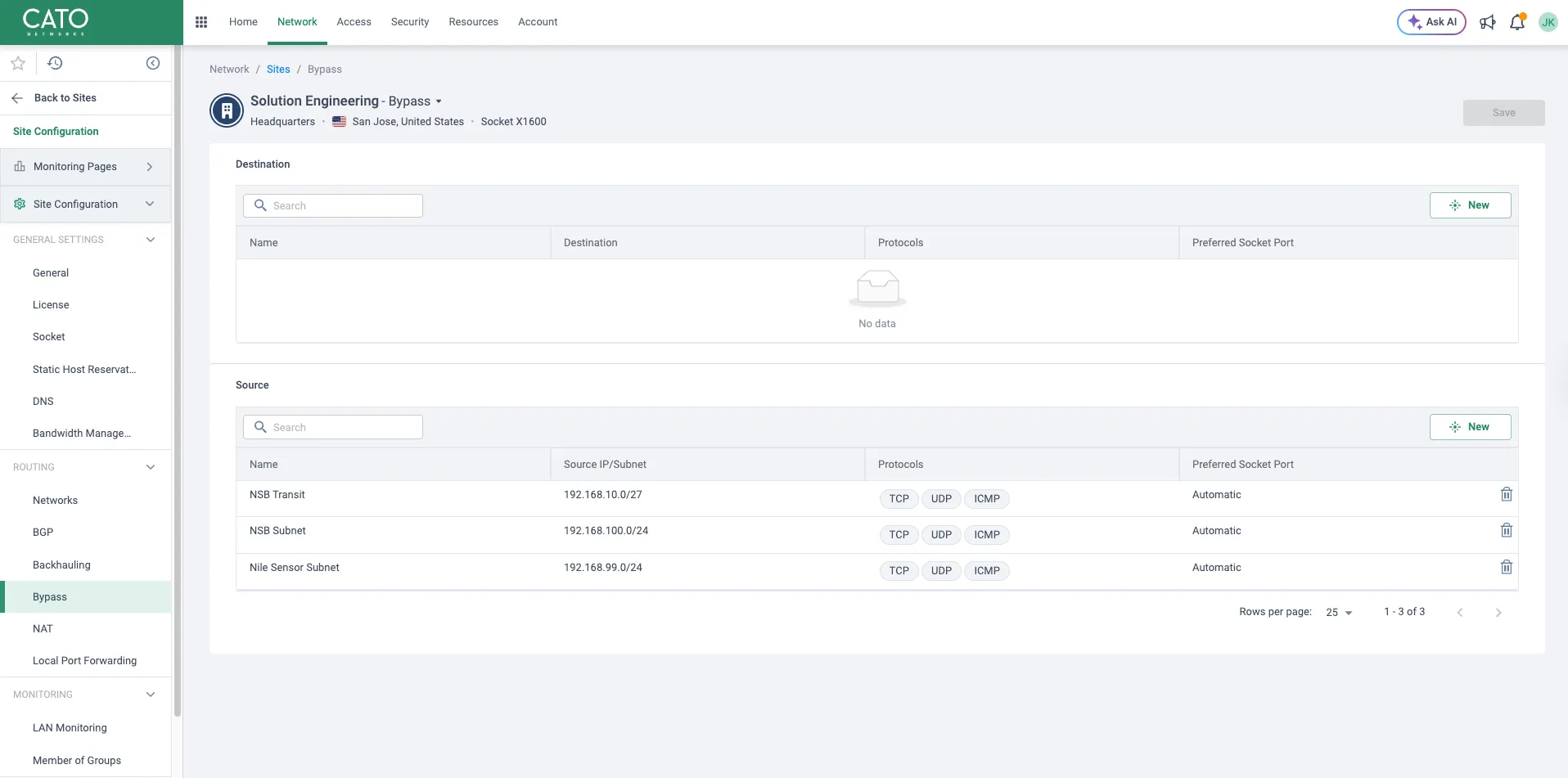
- Go to Network > Sites > Bypass.
- Under Source, define objects such as:
- NSB Transit – covering the 192.168.10.0/27 or equivalent aggregate for all four /30s.
- NSB Subnet – the NSB internal subnet(s).
- Nile Sensor Subnet – sensor IP ranges.
- Leave Destination empty or default, so these sources are bypassed regardless of destination.
Configuring BGP on NSB Gateways
NSB gateways will mirror the four-neighbor BGP design, and this configuration is currently performed by Nile Support. Please reach out to our Technical Support team to configure eBGP peering with the Cato Sockets. Self-service configuration through the Nile Portal will be available soon.
Verification
On Cato
- In Network > Sites > BGP, verify all four neighbors are in the Established state and learning prefixes from NSB (user/NSB subnets).
- Confirm that the Cato routing table shows NSB prefixes reachable via all four transit networks.
On Nile Gateways
- Check BGP neighbor status for all four Cato peers (192.168.10.1, .5, .9, .13).
- Verify that the Nile routing table has:
- Four ECMP default routes via the NSB–Cato transit interfaces.
- No unintended routes from Cato (if you filter to default only).
End-to-end tests
- From a client behind NSB, ping a resource reachable via Cato (e.g., an internet host or Cato‑connected site).
- Shut down individual NSB–Cato links (e.g., disable one Socket port or NSB sub‑interface) and confirm traffic continues via remaining BGP sessions.
- If using the NAT to WAN rule on Cato, verify that egress traffic from NSB appears sourced from the configured translated IP.